The headline this time is transparency and control over your usage. A new Usage Control tab shows where your monthly usage goes and how much runway you have left at your current pace. Get close to the limit and Suprmind moves you to a lighter team instead of stopping you cold – no hard walls, no lost work.
The rest is sharper thinking for less money. Spark relaunched, Debate and Sequential both improved, and another caching pass that lowers the cost of every conversation.
// Coming soon
Getting close: Red Team v2, a tougher adversarial mode with a risk dossier, MCP connectors, and the Adjutant, an all-aware project strategist that helps lead your chat sessions.
// In the development
True North – An automatic dual-layer hallucination prevention
One truth. Everything else is fabrication.
When five AIs build on one another, a single invented number can poison the whole chain. Model 1 hallucinates, model 2 misses it… and model 5 ships it as a recommendation.
True North is built to catch it.
True North checks claims as each model generates them – numbers, dates, named entities, citations, financial, legal, and scientific statements. It runs two independent verification layers: a native, organic multi-model AI behavior that flags recognized fabrication in the live thread, and an external verifier that operates within the same conversation but outside the model chain.
Currently calibrating Analyzer and Judge’s capabilities and speed.
// Now live
Monthly usage transparency and control
New tab on your settings page: Usage Control
- A usage bar that tells you where you stand – The new Usage Control tab in Settings shows a simple runway: roughly how many days of usage you have left at your current pace, not a wall of numbers. When you are on track, it says so in plain words.
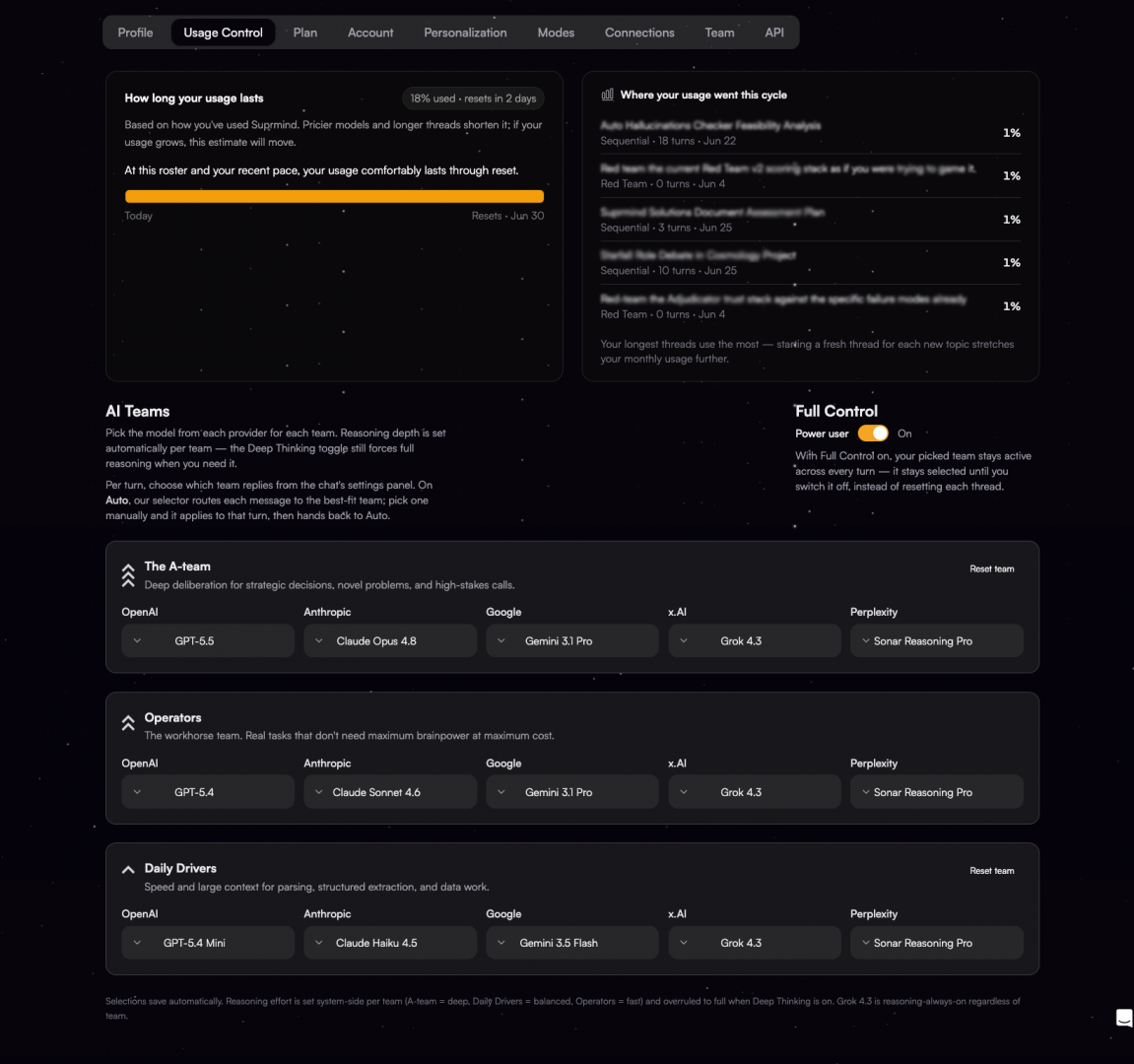
- Graceful limits instead of a hard stop – When you get close to your monthly usage, Suprmind no longer just stops you mid-thought. It switches you to the Daily Drivers team so you keep working, tells you exactly what changed, and gives you a one-click way to top up if you want the heavier models back.
- See which conversations use the most – A panel in the same Usage Control tab shows your top threads by share of usage. If you are running low, you can see exactly where it went instead of guessing.
- More room on Pro and Frontier – We raised the monthly usage on both paid plans. Same price, more space to work before you reach your limit.
- Even lower cost per conversation – We kept going on the caching work from last month. Same models, same answers, lower cost.
—— - Sharper Sequential – We tightened how the models build on each other in Sequential mode. A later model used to sometimes repeat an earlier answer instead of adding to it, or drop a correction made earlier in the turn. Now, models are encouraged to either move the answer forward or say they have nothing to add, and corrections carry through for the rest of the turn. The chain compounds instead of echoing.
- Spark, relaunched – Spark, from a simple intro, became a full-fledged plan, now $19 with a 7-day free trial. It comes with a lot more than before. You get AI Teams with two teams and eight models to pick from, more project templates, and bigger file uploads. If you joined at the original founding price, you keep it – the relaunch does not touch your plan.
- Debate, rebuilt – Debate v2 mode now runs in 3 turns, and a dedicated moderator writes the final verdict at the end. Before, one of the debaters effectively graded their own argument. Debaters now also work from the same project context and live web search the other modes use, so the arguments stand on your files and current data, not the model’s memory alone.
- The Adjudicator, back in the projects sidebar – When your models disagree, you now get cards in the project sidebar showing where they diverged, with inline cards under the message coming soon. One click asks the Adjudicator to settle it on the spot and write a decision brief.
- Clearer Response Length – The response length options were renamed to make it clear what each one does, and new chats now default to Key Points. You can switch between response length settings at any time.
- A peek at the collapsed sidebar – Minimize the left navigation, and you can now hover to peek at it, without expanding the whole thing back out.
// Did you know?
- Save to Project – Turn Any AI Response Into Permanent Knowledge
See a response you want to keep? Hit “Save to Project” and it becomes searchable, structured data in your project’s knowledge base. Next time any AI answers a question in that project, it can reference what you saved. You’re building a custom intelligence layer, one great response at a time. - Prompt Assistant – Your Messy Thoughts, Professionally Engineered
Not sure how to phrase your question? Just dump your raw thoughts into the Adjutant. It analyzes your intent, project files, previous threads, and structures a professional prompt, and lets you send it with one click. “I need to figure out why our API is slow, maybe the database or caching” becomes a structured multi-part analysis request with clear sections and priorities. You think the thought. Adjutant writes the prompt. - Parallel Task Assignment – Different Jobs for Different AIs
You can give each AI a completely different task in one message. Write something like: “@Grok – check X for sentiment about our launch. @Perplexity – find the top 5 competitors and their pricing. @Claude – search our project files for our positioning strategy. @GPT – build a SWOT from the results.” Each AI executes its specific assignment while seeing full conversation context. It’s project delegation, not just a group chat.