Too much to read. Not enough time to be wrong. Summaries decide what gets attention and what gets missed.
Most AI summaries sound confident but skip nuance, bury edge cases, and sometimes invent facts. In high-stakes work, that’s not a shortcut. It’s a liability.
This guide breaks down how AI summary generators actually work, when to use each approach, how to evaluate quality, and how to reduce hallucinations and omissions. It’s written for professionals who need auditability, accuracy, and speed when handling long reports, transcripts, and research.
What AI Summary Generators Actually Do
An AI summary generator compresses text while preserving meaning. The method matters more than you think.
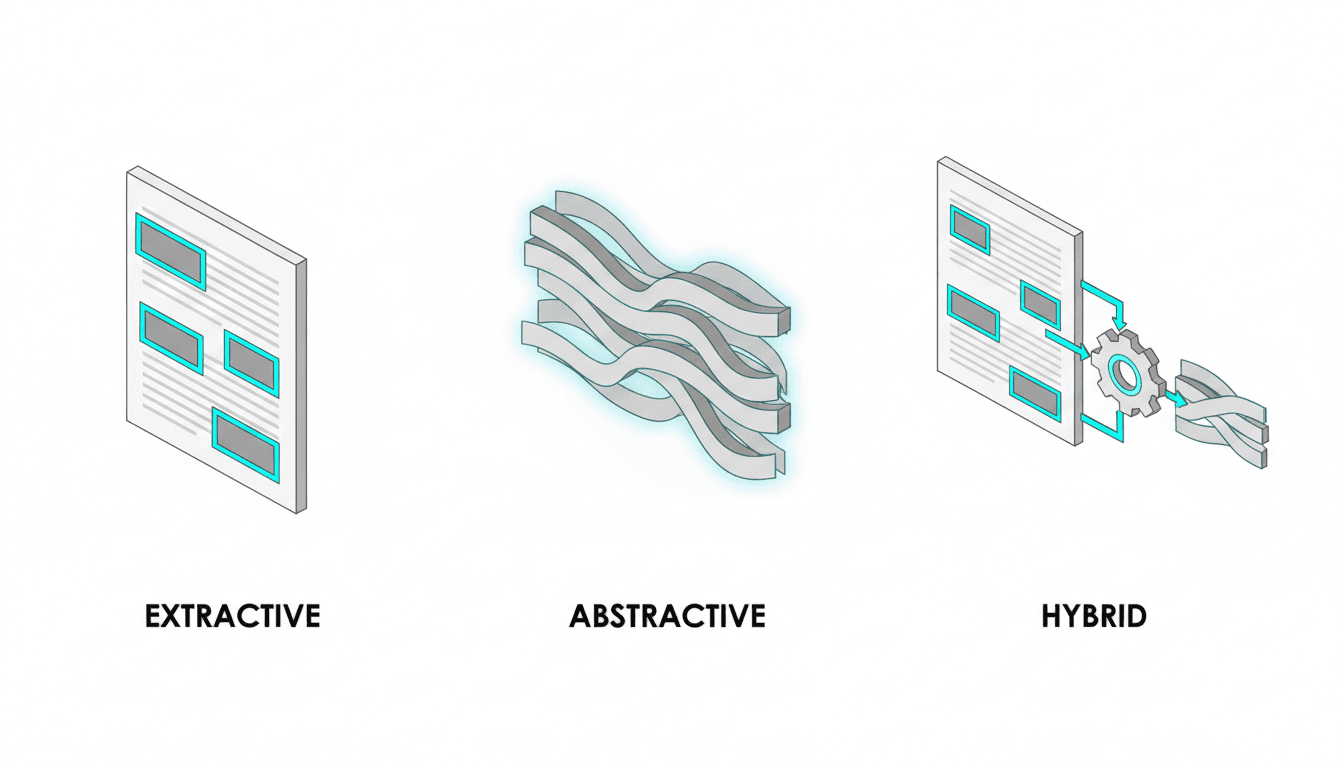
Three core approaches exist. Each trades off different things.
- Extractive summarization pulls exact sentences from the source. High fidelity. Awkward flow. Best when you can’t afford to lose terminology or claims.
- Abstractive summarization rewrites content in new words. Readable. Higher hallucination risk. Best for general audiences who need clarity over precision.
- Hybrid summarization combines both. Extracts key sentences, then rewrites for coherence. Balances fidelity and readability.
Most tools default to abstractive because it sounds better. That’s fine for blog posts. It’s dangerous for board decks, due diligence reports, or compliance briefs where missing a caveat creates risk.
When Summaries Fail
AI summaries fail in predictable ways. Knowing the patterns helps you catch problems early.
- Loss of nuance: Conditional statements become absolute. “May increase risk” becomes “increases risk.”
- Missing counterpoints: Dissenting views or edge cases get dropped because they complicate the narrative.
- Hallucinated links: The model invents connections between ideas that weren’t in the source.
- Confidence without coverage: The summary sounds complete but omits entire sections or stakeholder perspectives.
These failures compound in multi-document synthesis. When you summarize five research papers into one brief, the model picks a dominant narrative and suppresses disagreement. That’s exactly backward for high-stakes decisions.
How Context Window Limitations Shape Output
Most AI models handle 8,000 to 128,000 tokens. A 60-page PDF often exceeds that limit.
When input is too long, the system chunks it. Each chunk gets summarized separately. Then those summaries get combined.
This creates gaps. Chunking strategies determine what gets lost.
- Fixed-size chunks (every 2,000 words) often split mid-argument.
- Section-aware chunking respects document structure but still misses cross-references.
- Hierarchical summarization builds a tree of summaries but loses fine-grained detail at each level.
Newer models with million-token context windows reduce this problem. They still struggle with recall across very long inputs. The model forgets details from page 3 by the time it reaches page 300.
Extractive vs Abstractive vs Hybrid: Choosing the Right Method
The right summarization method depends on what you’re protecting against.
Extractive Summarization: Maximum Fidelity
Extractive methods select sentences directly from the source. No rewriting. No paraphrasing.
Use extractive when:
- Legal or compliance contexts require exact wording
- Technical terminology must stay intact
- You need to trace every claim back to a source sentence
- Audit trails matter more than readability
The output reads like highlighted passages. It’s choppy. Transitions are abrupt. But you know every sentence came from the original.
Extractive summarization uses semantic compression to rank sentences by importance. Models score sentences based on keyword density, position, and similarity to the document’s main themes. The top-ranked sentences become the summary.
Abstractive Summarization: Maximum Clarity
Abstractive methods rewrite content in new words. The model generates sentences that weren’t in the source.
Use abstractive when:
- Readability matters more than exact wording
- You’re creating executive briefs for non-technical audiences
- The source is repetitive or poorly written
- You need a specific format like bullet points or TL;DR
The output flows naturally. It’s concise. But it introduces risk. The model might simplify a qualified claim into an absolute statement. It might merge two separate ideas into one. It might invent a conclusion that sounds logical but wasn’t stated.
Abstractive summarization is the default for most AI text summarizer tools. It produces better-sounding output. That’s why it’s dangerous without verification.
Hybrid Summarization: Balanced Approach
Hybrid methods extract key sentences first, then rewrite them for coherence. You get fidelity where it matters and clarity where it helps.
Use hybrid when:
- You need both accuracy and readability
- The source mixes technical and narrative content
- You’re producing summaries for mixed audiences
- You want to preserve critical claims while improving flow
Hybrid summarization is harder to implement but produces the best results for most professional use cases. It’s the approach used by advanced automatic summary tools that prioritize quality over speed.
Handling Long Documents and Multi-Document Synthesis
Single-page summaries are straightforward. Long documents and multi-source synthesis require different strategies.
Summarizing Long PDFs and Reports
A 200-page report needs a structured approach. Treating it like a long article produces shallow summaries that miss section-specific insights.
Step-by-step workflow for long document summarizer:
- Ingest the full document with section metadata (table of contents, headers, page numbers)
- Enable section-aware chunking so arguments stay intact
- Run hybrid summary on each section: extract key sentences, then rewrite for clarity
- Require citations with paragraph or page references for every claim
- Enforce must-include topics: methods, limitations, risks, counterarguments
- Generate two outputs: a 200-word executive TL;DR and a 1,500-word detailed brief
This workflow prevents the most common failure mode: producing a confident-sounding summary that omits entire sections because they didn’t fit the dominant narrative.
Summarizing Meeting Transcripts
Meeting transcripts are different from documents. They’re conversational, repetitive, and full of tangents.
A good meeting transcript summarizer extracts structure from chaos.
Workflow for meeting notes summarizer:
- Segment transcript by speaker and topic shifts
- Summarize each segment separately to preserve context
- Extract decisions, action items, owners, and deadlines
- Aggregate duplicate points across segments
- Resolve conflicting statements by flagging disagreements
- Output action items with risk callouts
The goal is to turn 60 minutes of conversation into a 5-minute read with clear next steps. Most AI meeting notes summarizer tools skip the disagreement resolution step. That’s a mistake. Unresolved conflicts in meetings become unresolved problems in execution.
Multi-Document Synthesis
Synthesizing multiple sources into one brief is where most summarization tools break down. They either produce a shallow overview or pick one source as authoritative and ignore the rest.
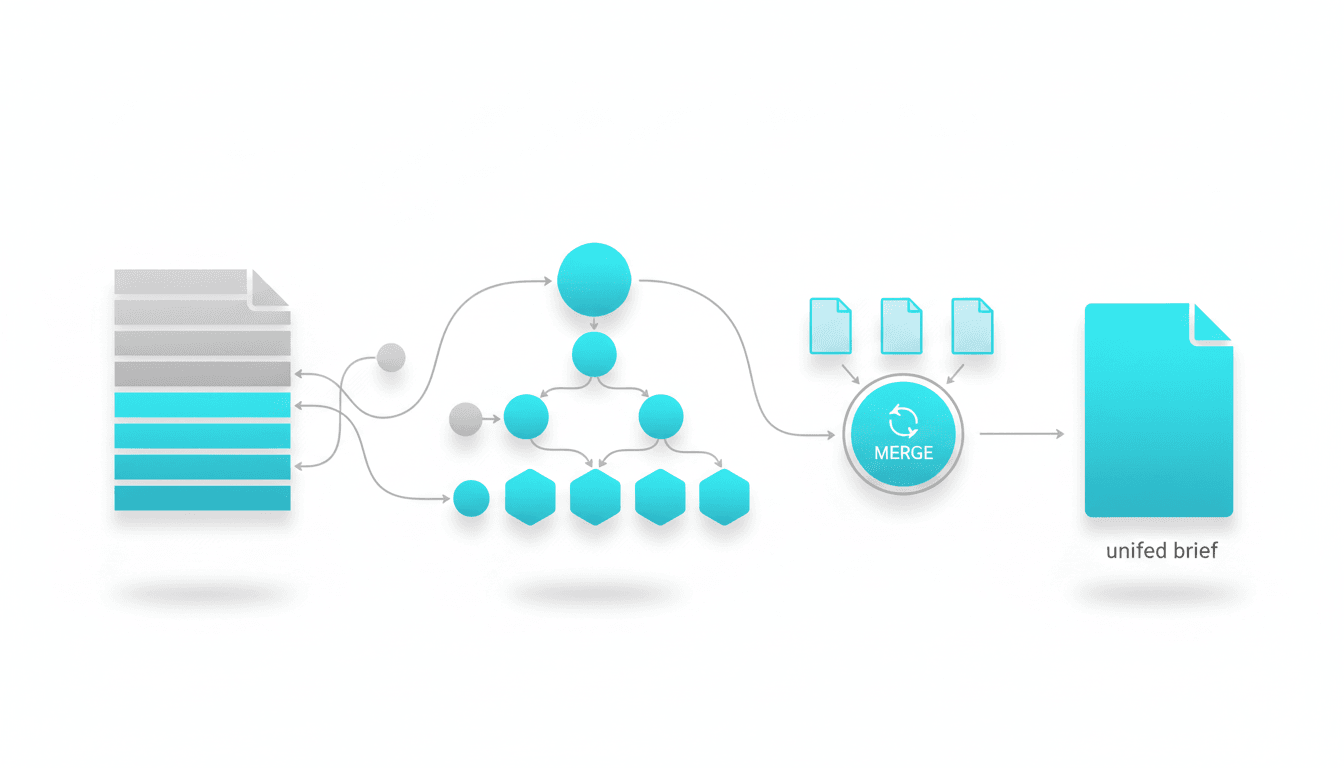
Workflow for multi-document synthesis:
- Summarize each source individually with citations
- Run cross-document deduplication to merge overlapping points
- Surface disagreements and edge cases explicitly
- Produce a unified brief with a dissent section
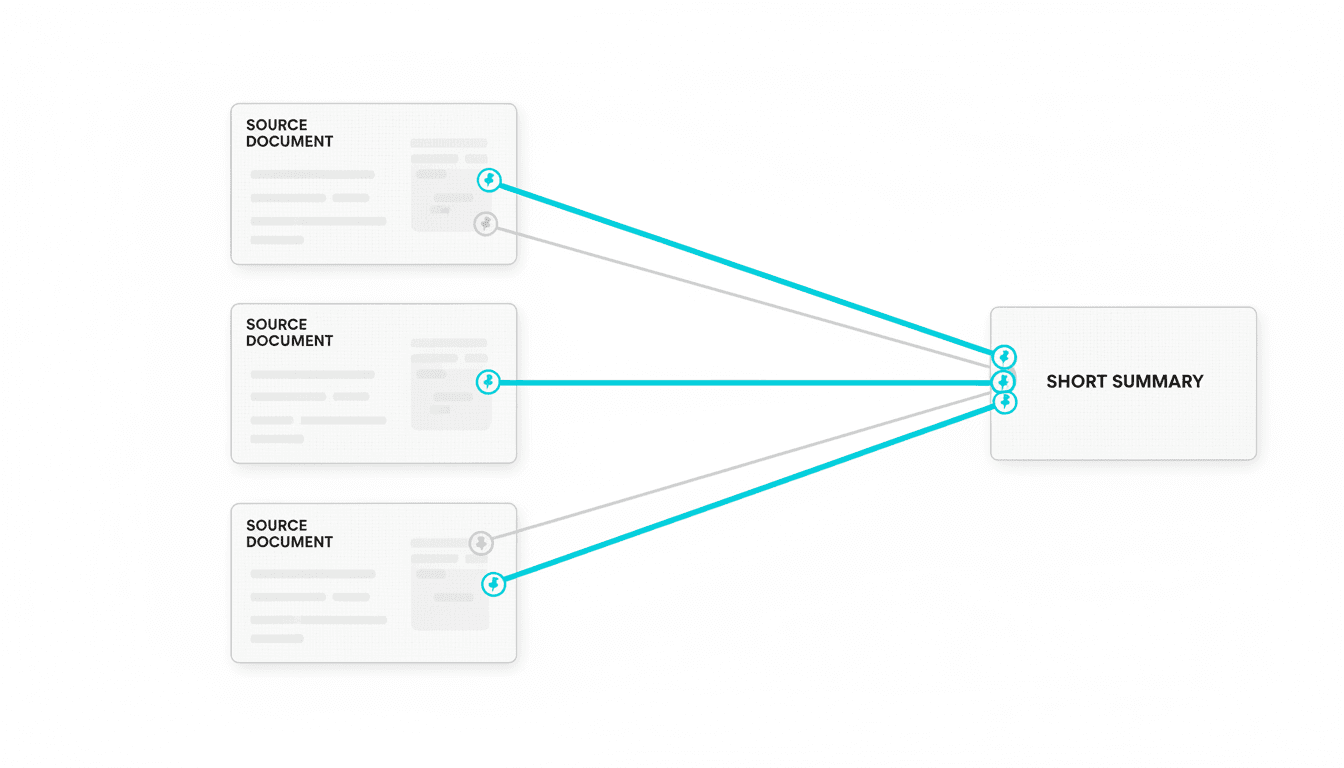
- Include a source map showing which claims came from which documents
This approach treats disagreement as signal, not noise. When three research papers agree on a conclusion but one dissents, that dissent might be the most important finding. A good summary preserves it.
For professionals who need validated, cross-verified outputs across multiple sources, multi-AI orchestration can compare models and flag disagreements before you commit to a single narrative.
Evaluation: How to Test Summary Quality
Most people evaluate summaries by reading them. That’s necessary but not sufficient. You need a rubric.
Five-Dimension Quality Rubric
Rate each summary on these dimensions. A score below 3 on any dimension means the summary needs rework.
- Fidelity (1-5): Does the summary preserve the source’s claims, caveats, and terminology without distortion?
- Completeness (1-5): Are all major themes, stakeholder perspectives, and edge cases represented?
- Clarity (1-5): Can a non-expert understand the summary without reading the source?
- Risk sensitivity (1-5): Are limitations, uncertainties, and counterarguments clearly flagged?
- Citation coverage (1-5): Can you trace every claim back to a specific source location?
This rubric catches problems that readability alone misses. A summary can sound great but score low on fidelity or risk sensitivity. Those gaps create liability in high-stakes contexts.
Formal Evaluation Metrics
Academic researchers use automated metrics to evaluate summarization quality. These metrics compare a generated summary to a reference summary written by humans.
ROUGE (Recall-Oriented Understudy for Gisting Evaluation): Measures overlap between generated and reference summaries. Higher ROUGE scores mean more shared n-grams. It’s a proxy for recall.
BERTScore: Uses contextual embeddings to measure semantic similarity. It catches paraphrasing that ROUGE misses. Better for abstractive summaries.
These metrics are useful for comparing tools or tracking improvements. They don’t replace human judgment. A summary can score high on ROUGE but still miss critical nuance or introduce subtle distortions.
Quick Human Review Patterns
You don’t have time to read every source document in full. Use these shortcuts to catch problems fast.
- Spot-check sources: Pick three random claims from the summary. Verify they appear in the source with the same meaning.
- Dissent scan: Search the source for words like “however,” “but,” “limitation,” “risk.” Check if those caveats made it into the summary.
- Edge case test: Ask yourself what the summary doesn’t say. Look for those topics in the source. If they’re important and missing, the summary failed.
- Confidence check: Does the summary express certainty where the source expressed uncertainty? That’s a red flag.
These patterns take 5 minutes per summary. They catch 80% of quality problems without reading the full source.
Reducing Hallucinations and Omissions
Hallucinations are when the model generates plausible-sounding text that isn’t supported by the source. Omissions are when important information gets dropped. Both are failures.
Why Hallucinations Happen
Language models predict the next token based on patterns they learned during training. When summarizing, they sometimes generate text that fits the pattern but wasn’t in the source.
Hallucinations increase when:
- The source is ambiguous or incomplete
- The model is asked to be more concise than the content allows
- The summary format requires information the source doesn’t provide
- The model’s training data contains similar-looking but incorrect information
You can’t eliminate hallucinations entirely. You can reduce them through prompt design and verification.
Prompt Strategies to Reduce Hallucinations
How you ask for a summary changes what you get. These prompt patterns reduce hallucination risk.
Extractive prompt template:
“Select the 12 most critical sentences from this document. Preserve exact wording. Group by theme. Include source paragraph references for each sentence.”
Abstractive prompt template:
“Rewrite this document into a 200-word executive brief. Preserve all claims, numbers, and caveats. Include a 5-bullet TL;DR at the start. Mark any areas where the source was unclear or incomplete.”
Hybrid prompt template:
“Combine extracted sentences with a 150-word synthesis. Use exact quotes for claims involving numbers, risks, or commitments. Paraphrase background and context. Flag any low-confidence areas and missing data.”
These prompts force the model to distinguish between what it knows from the source and what it’s inferring. The result is more accurate output with fewer invented details.
Cross-Verification to Catch Errors
Single-model summaries are vulnerable to systematic biases. The model might consistently miss certain types of information or consistently distort certain types of claims.
Cross-verification uses multiple models to check each other. When models disagree, you investigate. When they agree, you gain confidence.
Cross-verification workflow:
- Generate summaries from two or three different models
- Compare outputs to identify disagreements
- For each disagreement, check the source to determine which summary is correct
- Use the verified points to build a final summary
- Flag any claims where models agreed but you found errors (systematic bias)
This workflow takes more time but dramatically reduces hallucinations and omissions. It’s the approach professionals use when errors are costly. Cross-verification in action shows how disagreement between models reveals truth that single perspectives miss.
Must-Include Constraints
Omissions happen when the model decides certain information isn’t important. You can prevent this by specifying must-include topics.
Example constraint for research summary:
“Your summary must include: research question, methodology, sample size, key findings, limitations, and implications. If any of these are missing from the source, state that explicitly.”
This forces the model to account for every required element. If the source doesn’t cover limitations, the summary says so. That’s better than silently omitting them.
Citations and Source Traceability
A summary without citations is an opinion. In high-stakes work, you need to trace every claim back to a source location.
Why Citations Matter
Citations enable three things:
- Verification: You can check if the summary accurately represents the source
- Accountability: You know who to credit or question for each claim
- Compliance: Regulated industries require documented evidence chains
Most AI summary tools don’t include citations by default. You have to ask for them explicitly.
Citation Formats That Work
Different contexts need different citation styles. Pick the one that matches your workflow.
Paragraph references: “The study found a 23% increase in engagement (para 4).”
Page references: “Revenue projections assume 15% growth (p. 12).”
Source spans: “Three risk factors were identified: market volatility, regulatory changes, and supply chain disruptions (Section 2.3, paras 8-10).”
Inline links: For web content, link key claims directly to source URLs or anchor tags.
Source spans are the most useful for long documents. They give enough context to find the claim quickly without reading the entire source.
Enforcing Citations in Prompts
Add citation requirements to your summarization prompts.
“Generate a summary with citations. After each claim, include a paragraph reference in parentheses. Format: (para X) or (Section Y, para Z). Do not make claims without citations.”
Watch this video about AI summary generator:
This simple addition dramatically improves traceability. The model learns to ground every statement in the source.
Governance, Privacy, and Audit Trails
Summarization in professional contexts raises governance questions. Who has access? How is sensitive data protected? Can you prove the summary is accurate?
Privacy and Data Handling
Most AI summary generators send your text to external servers. That’s a problem for confidential information.
Privacy checklist:
- Does the tool store your input? For how long?
- Is data used to train future models?
- Are there options for on-premise or private cloud deployment?
- Can you redact sensitive information before summarization?
- Does the tool support data residency requirements (EU, US, etc.)?
For highly sensitive documents, consider tools that run locally or offer private instances. Alternatively, redact names, numbers, and identifying details before summarization.
Audit Trails and Versioning
In regulated industries, you need to prove how a summary was generated and who reviewed it.
Audit trail requirements:
- Timestamp for when the summary was generated
- Model version and parameters used
- Original source document (or hash to verify it hasn’t changed)
- Human reviewer sign-off and any manual edits
- Version history if the summary is updated
Most consumer AI tools don’t support this level of governance. Enterprise platforms do. If you’re summarizing contracts, medical records, or financial reports, audit trails aren’t optional.
Human-in-the-Loop Review
No AI summary should go directly to stakeholders without human review. The review doesn’t have to be exhaustive, but it has to happen.
Minimum review protocol:
- Spot-check three random claims against the source
- Verify that must-include topics are present
- Scan for hallucination red flags (invented statistics, overly confident language)
- Check that caveats and limitations are preserved
- Sign off with your name and date
This takes 5-10 minutes per summary. It catches most errors and creates accountability.
Choosing the Best AI Summary Tool for Your Needs
Not all AI summary generators are built for the same use cases. The best tool depends on what you’re summarizing and what you’re protecting against.
Factors to Consider
When evaluating tools, ask these questions:
- Input types: Does it handle PDFs, Word docs, transcripts, web pages?
- Length limits: What’s the maximum input size? How does it handle longer documents?
- Summarization method: Extractive, abstractive, or hybrid? Can you choose?
- Citations: Does it provide source references automatically?
- Customization: Can you specify must-include topics or output format?
- Privacy: Is your data stored? Used for training? Can you run it privately?
- Accuracy: Does it support cross-verification or multi-model approaches?
General-purpose tools work for low-stakes summarization. High-stakes work requires specialized features like citations, cross-verification, and governance controls.
When to Use General Tools vs Specialized Platforms
General tools like ChatGPT or Claude are fast and accessible. Use them for:
- Personal research and note-taking
- Drafting initial summaries that will be heavily edited
- Non-confidential content where errors are low-cost
Specialized platforms offer features general tools lack. Use them for:
- Multi-document synthesis with deduplication
- Summaries requiring citations and audit trails
- High-stakes decisions where hallucinations create liability
- Regulated industries with compliance requirements
The cost difference is significant. General tools are cheap or free. Specialized platforms charge based on usage or require enterprise contracts. The decision comes down to risk tolerance.
Implementation: Prompt Templates and Workflows
Theory is useful. Implementation is what matters. Here are prompt templates and workflows you can use immediately.
Extractive Summary Template
“Read this document and select the 15 most important sentences. Preserve exact wording. Group sentences by theme. For each sentence, include the source paragraph number in parentheses. Themes to cover: main argument, supporting evidence, limitations, and implications.”
Use this when fidelity matters more than flow. The output will be choppy but accurate.
Abstractive Summary Template
“Rewrite this document as a 250-word executive brief for a non-technical audience. Start with a 3-sentence overview. Then provide 5 key takeaways as bullet points. Preserve all numbers, claims, and caveats. Use clear, direct language. Avoid jargon.”
Use this when you need readability for decision-makers who won’t read the full source.
Hybrid Summary Template
“Create a summary combining extracted sentences and synthesis. Extract the 8 most critical sentences (preserve exact wording). Then write a 200-word synthesis that connects these points and provides context. Include paragraph references for extracted sentences. Mark any claims where the source was ambiguous.”
Use this when you need both accuracy and coherence.
Multi-Document Synthesis Template
“I’m providing three research papers on the same topic. For each paper, generate a 150-word summary with citations. Then synthesize all three into a unified 400-word brief. Highlight areas where papers agree and disagree. Include a section called ‘Unresolved Questions’ for points where evidence conflicts.”
Use this when you need to compare sources and surface disagreement.
Meeting Notes Template
“Summarize this meeting transcript. Output format: 1) Decisions made (with owners), 2) Action items (with deadlines), 3) Unresolved issues, 4) Key discussion points. For each item, include the timestamp or speaker. Flag any contradictory statements.”
Use this to turn long meetings into actionable next steps.
Advanced Techniques: Topic Modeling and Semantic Compression
Basic summarization extracts or rewrites text. Advanced techniques use semantic analysis to identify themes and compress information more intelligently.
Topic Modeling for Theme Extraction
Topic modeling identifies recurring themes across documents. Instead of summarizing linearly, you summarize by topic.
How it works:
- The model analyzes the document to identify latent topics
- It groups sentences or paragraphs by topic
- It generates a summary for each topic
- It presents topics in order of importance or relevance
This approach works well for long documents with multiple threads. Instead of a chronological summary, you get a thematic one.
Semantic Compression
Semantic compression removes redundancy while preserving meaning. It’s particularly useful for repetitive sources like legal documents or meeting transcripts.
Techniques include:
- Deduplication of semantically similar sentences
- Merging related points into single statements
- Removing filler phrases and unnecessary qualifiers
- Collapsing examples into general principles
The result is a denser summary that covers more ground in fewer words.
Evaluating Output: A Practical Checklist
Use this checklist to evaluate any AI-generated summary before you use it.
Fidelity Check
- Are claims accurately represented without distortion?
- Are caveats and limitations preserved?
- Are numbers and statistics correct?
- Is technical terminology used correctly?
Completeness Check
- Are all major themes covered?
- Are counterarguments or dissenting views included?
- Are edge cases and exceptions mentioned?
- Are all stakeholder perspectives represented?
Clarity Check
- Can a non-expert understand the summary?
- Is the structure logical and easy to follow?
- Are transitions smooth?
- Is jargon explained or avoided?
Risk Sensitivity Check
- Are uncertainties and limitations clearly flagged?
- Are risks and downsides mentioned?
- Is confidence level appropriate (not overconfident)?
- Are unresolved questions identified?
Citation Check
- Does every claim have a source reference?
- Can you trace claims back to specific locations?
- Are citations formatted consistently?
- Are there any unsupported assertions?
If any check fails, the summary needs rework. Don’t skip this step. The cost of using a flawed summary in high-stakes work is higher than the time to fix it.
Real-World Use Cases and Workflows
Theory matters less than practice. Here are workflows for common professional use cases.
Due Diligence and Investment Research
You’re evaluating a potential acquisition. You have 200 pages of financial statements, contracts, and market analysis. You need a 10-page brief for the board.
Workflow:
- Segment documents by type (financials, contracts, market research)
- Summarize each document with extractive method to preserve exact terms
- Identify must-include topics: revenue trends, liabilities, market risks, competitive position
- Run cross-document synthesis to find contradictions
- Generate executive brief with citations to source documents
- Human review focused on risk factors and financial claims
The goal is to compress information while preserving every red flag and caveat.
Academic Literature Review
You’re writing a research proposal. You need to synthesize 30 papers into a literature review that identifies gaps and positions your work.
Workflow:
- Summarize each paper individually: research question, methods, findings, limitations
- Use topic modeling to group papers by theme
- For each theme, identify consensus and disagreement
- Generate theme-based summaries with citations
- Write a synthesis section highlighting unresolved questions
- Position your proposed research as addressing those gaps
The goal is to show you understand the field and can identify where it needs to go next.
Policy Analysis and Compliance Review
You’re reviewing a new regulation. You need to summarize implications for your organization and identify compliance requirements.
Workflow:
- Summarize the regulation with extractive method to preserve legal language
- Identify sections that apply to your organization
- Extract specific requirements, deadlines, and penalties
- Generate a compliance checklist with source citations
- Flag ambiguous areas that need legal review
- Create an action plan with owners and timelines
The goal is to turn dense regulatory text into clear next steps without missing obligations.
Executive Briefing from Long Reports
Your team produced a 50-page quarterly report. Your CEO needs a 2-page summary before tomorrow’s board meeting.
Workflow:
- Identify must-include topics: key metrics, wins, challenges, risks, next quarter priorities
- Run hybrid summary: extract critical data points, rewrite context for clarity
- Generate a 5-bullet TL;DR at the top
- Include a 1-paragraph risk section with mitigation plans
- Add 3-5 data visualizations (charts, not text)
- Human review to ensure tone matches CEO’s communication style
The goal is to give the CEO everything they need to brief the board without reading the full report.
Frequently Asked Questions
How accurate are AI summaries compared to human summaries?
Accuracy depends on the method and verification process. Extractive summaries are highly accurate because they use exact sentences from the source. Abstractive summaries introduce more risk because the model rewrites content. Studies show that single-model abstractive summaries have hallucination rates between 10-30% depending on the task. Cross-verified summaries reduce this significantly. For high-stakes work, always combine AI summarization with human review.
Can these tools summarize PDFs and scanned documents?
Most tools handle text-based PDFs directly. For scanned documents or images, you need OCR (optical character recognition) first. Some platforms include OCR as a preprocessing step. Quality varies based on scan quality and document formatting. After OCR, the text can be summarized normally. Check for OCR errors before summarizing, especially with technical documents where a misread number creates problems.
What’s the difference between a summary and an executive brief?
A summary condenses the source while preserving structure and detail. An executive brief is written for decision-makers and emphasizes implications, risks, and next steps. Executive briefs typically include a TL;DR section, prioritized findings, and a recommendation or action plan. They’re shorter and more opinionated than summaries. Use summaries when you need comprehensive coverage. Use executive briefs when you need to drive decisions.
How do I prevent the tool from missing important details?
Use must-include constraints in your prompt. Specify topics that must be covered: “Your summary must address: methodology, key findings, limitations, risks, and next steps.” If the source doesn’t cover a required topic, the summary should state that explicitly. Also use extractive or hybrid methods for critical content where omissions are costly. Finally, spot-check the summary against the source to verify important details made it through.
Are there industry-specific tools for medical or legal summarization?
Yes. Medical summarization tools are trained on clinical literature and preserve medical terminology. Legal summarization tools handle contract language and regulatory text. These specialized tools understand domain-specific structure and terminology better than general tools. They also include compliance features like audit trails and data privacy controls. If you work in a regulated industry, use domain-specific tools rather than general-purpose ones.
How do I handle confidential information when using these tools?
Redact sensitive information before summarization. Remove names, identifying numbers, proprietary data, and anything covered by NDA. Some tools offer private deployment options that don’t send data to external servers. For highly sensitive documents, use on-premise or private cloud solutions. Always check the tool’s data retention and training policies. If the tool uses your input to train future models, that’s a problem for confidential content.
Can I use these summaries in published research or reports?
AI-generated summaries should be reviewed and edited before publication. Many journals require disclosure if AI tools were used. The summary is a starting point, not a final product. You’re responsible for accuracy, so verify claims against sources and add citations. Treat AI summaries like a research assistant’s draft: useful but requiring your oversight and sign-off before it represents your work.
Key Takeaways: Using AI Summary Generators Effectively
AI summary generators are powerful tools when used correctly. They’re liabilities when used carelessly.
Remember these principles:
- Choose the method based on stakes: extractive for fidelity, abstractive for readability, hybrid for both
- Use citations and must-include constraints to prevent omissions
- Adopt evaluation rubrics and quick human review loops to catch errors
- For high-stakes contexts, use cross-verification to reduce hallucinations
- Implement governance controls for sensitive or regulated content
You now have the frameworks, prompts, and checklists to produce reliable summaries without missing what matters. The difference between a useful summary and a dangerous one is verification. Build that into your workflow from the start.
If your work involves validated outputs across multiple perspectives where disagreement reveals truth, explore how orchestration approaches support cross-verified summaries in professional contexts.