
If your decisions can’t afford to be wrong, a single-model chat window isn’t enough. Analysts, counsel, and researchers face high-stakes calls with incomplete AI outputs. Tool sprawl, single-model bias, and brittle prompts compound risk.
AI agent orchestration platforms coordinate multiple models and tools, preserve context, and surface healthy disagreement so you can audit the trail to a decision. This guide maps the landscape, capabilities, and selection criteria for professionals evaluating orchestration platforms to improve decision quality.
You’ll learn how to benchmark vendors by ensemble modes, context persistence, document-native workflows, and conversation control. We’ll walk through role-specific scenarios and provide a downloadable evaluation rubric.
What Is an AI Agent Orchestration Platform?
An AI agent orchestration platform coordinates multiple large language models, tools, and data sources to produce richer, more reliable outputs than any single AI can deliver. Think of it as a conductor managing an ensemble rather than a soloist performing alone.
These platforms differ from standalone chat interfaces in three ways:
- Multi-LLM ensembles run queries across several models simultaneously
- Orchestration modes structure how models interact (sequential, fusion, debate, red team)
- Persistent context stores maintain project memory across conversations
The category spans managed platforms, developer-first frameworks, and enterprise suites. Managed platforms handle infrastructure and model routing. Frameworks give you control but require engineering effort. Enterprise suites bundle orchestration with compliance and governance layers.
Core Building Blocks
Every orchestration platform combines these components:
- Model router – directs queries to appropriate LLMs based on task type
- Context manager – stores conversation history, documents, and project state
- Tool adapter – connects external APIs, databases, and search engines
- Output synthesizer – merges responses from multiple models into coherent answers
- Audit logger – captures decision trails for review and compliance
The platform’s value comes from how these pieces work together. A robust orchestration system lets you compose specialized AI teams for different workflows.
Why Ensembles Matter
Single-model outputs carry hidden risks. Hallucinations slip through. Biases go undetected. Confidence scores mislead.
Multi-LLM ensembles treat disagreement as a feature. When models produce different answers, you learn where uncertainty lives. Cross-model corroboration builds confidence. Debate modes force models to defend their reasoning.
Research shows ensemble methods reduce hallucination rates by 40-60% compared to single-model queries. The cost is higher compute and latency, but for high-stakes decisions, that trade-off makes sense.
Orchestration Modes Explained
Platforms differentiate themselves through the orchestration modes they support. Each mode structures model interaction differently.
Sequential Mode
Models work in a pipeline. One model’s output becomes the next model’s input. Use this for multi-step workflows where each stage requires different expertise.
Example workflow:
- Model A extracts entities from a legal brief
- Model B maps relationships between entities
- Model C generates a summary with citations
Sequential mode works well for document processing pipelines and research synthesis. The weakness is error propagation – mistakes compound downstream.
Fusion Mode
Multiple models answer the same query independently. The platform merges their responses into a single output, weighting by confidence or voting.
Fusion reduces hallucinations through consensus. If four models agree and one dissents, you can flag the outlier. If models split evenly, you know the question needs human judgment.
Use fusion for factual queries where correctness matters more than creativity. Investment thesis validation and due diligence fit this pattern.
Debate Mode
Models take opposing positions and argue. The platform captures both sides, then synthesizes a balanced view or asks you to choose.
Debate mode surfaces assumptions and edge cases. One model might emphasize growth potential while another flags risks. You see the full picture instead of a single perspective.
This mode shines for strategic analysis and decision validation. Legal arguments, market positioning, and investment trade-offs all benefit from structured disagreement.
Red Team Mode
One model generates an answer. A second model attacks it, looking for flaws, biases, and unsupported claims. A third model synthesizes the exchange.
Red team orchestration catches errors before they matter. Use it for high-stakes outputs – legal memos, compliance reviews, regulatory filings.
The process takes longer but produces more defensible work. You get an audit trail showing what objections were raised and how they were resolved.
Research Symphony Mode
A specialized ensemble for deep research. Models divide tasks by type:
- One model searches and retrieves sources
- Another extracts and structures information
- A third synthesizes findings and identifies gaps
- A fourth validates citations and checks consistency
Research symphony automates the literature review process. It works best when you have a large corpus and need comprehensive coverage.
Targeted Mode
Route specific questions to the best-fit model. The platform maintains a capability matrix – which models excel at code, legal reasoning, creative writing, or quantitative analysis.
Targeted mode optimizes for speed and cost. You don’t run five models when one specialized model can handle the task. Use this for production workflows where you’ve mapped task types to model strengths.
Evaluation Rubric for Platform Selection
Compare vendors across eight weighted dimensions. Score each on a 1-10 scale, multiply by weight, and sum for a total score.
| Criterion | Weight | What to Assess |
|---|---|---|
| Orchestration Modes | 25% | Which modes supported? Can you customize mode logic? |
| Context Persistence | 20% | How long does context survive? Can you search and reference past conversations? |
| Document Workflows | 15% | Native PDF/doc support? Vector search? Citation accuracy? |
| Conversation Control | 15% | Can you interrupt, queue messages, adjust response depth? |
| Governance & Audit | 10% | Decision trails? PII handling? Compliance certifications? |
| Integrations | 5% | API access? Connectors to your tools? Export formats? |
| Performance | 5% | Latency? Uptime SLA? Rate limits? |
| Total Cost | 5% | Pricing model? Hidden fees? Compute efficiency? |
Adjust weights based on your priorities. If you run long research projects, boost context persistence. If you handle sensitive data, increase governance weight.
Orchestration Modes Assessment
Ask vendors:
- Which modes do you support out of the box?
- Can I create custom orchestration logic?
- How do you handle model disagreements?
- Can I see intermediate outputs from each model?
- What’s the latency penalty for multi-model queries?
Test each mode with a real workflow. Run a debate on a contentious question. Try red team on a draft memo. Measure how well the synthesis captures nuance.
Context Persistence Deep Dive
Context persistence separates platforms from chat toys. Your work spans days or weeks. You need the AI to remember what you discussed last Tuesday.
A persistent context fabric stores conversation history, documents, and project metadata. You can reference past exchanges, search for specific claims, and build on previous work.
Evaluate context systems on:
- Retention period – how long does context survive?
- Search capability – can you find specific information?
- Cross-conversation linking – can you reference Project A while working on Project B?
- Selective forgetting – can you clear sensitive data?
Some platforms use vector databases to store embeddings of your conversations. Others maintain structured knowledge graphs. The best systems combine both – vectors for semantic search, graphs for relationship mapping.
Document-Native Workflows
If you work with PDFs, contracts, or research papers, document support matters. Look for:
- Native PDF parsing without copy-paste
- Citation accuracy with page numbers
- Cross-document entity linking
- Vector search across your document library
- Annotation and highlighting tools
A knowledge graph for relationship mapping connects entities across documents. If you’re analyzing a company, the graph links people, transactions, and subsidiaries automatically.
Test document workflows by uploading a 50-page contract. Ask the AI to extract key terms, identify risks, and compare to a template. Check citation accuracy – do page numbers match?
Conversation Control Features
Production workflows need control. You can’t wait 30 seconds for a response you realize is wrong. You need to interrupt, redirect, and adjust on the fly.
Advanced conversation control includes:
- Stop/interrupt – halt generation mid-response
- Message queuing – stack multiple queries and process in order
- Response depth – toggle between concise and detailed outputs
- Model selection override – force a specific model for a query
- Regenerate with constraints – “shorter,” “more technical,” “cite sources”
These controls turn the platform into a professional tool instead of a black box. You guide the AI instead of accepting whatever it produces.
Decision Validation Workflows

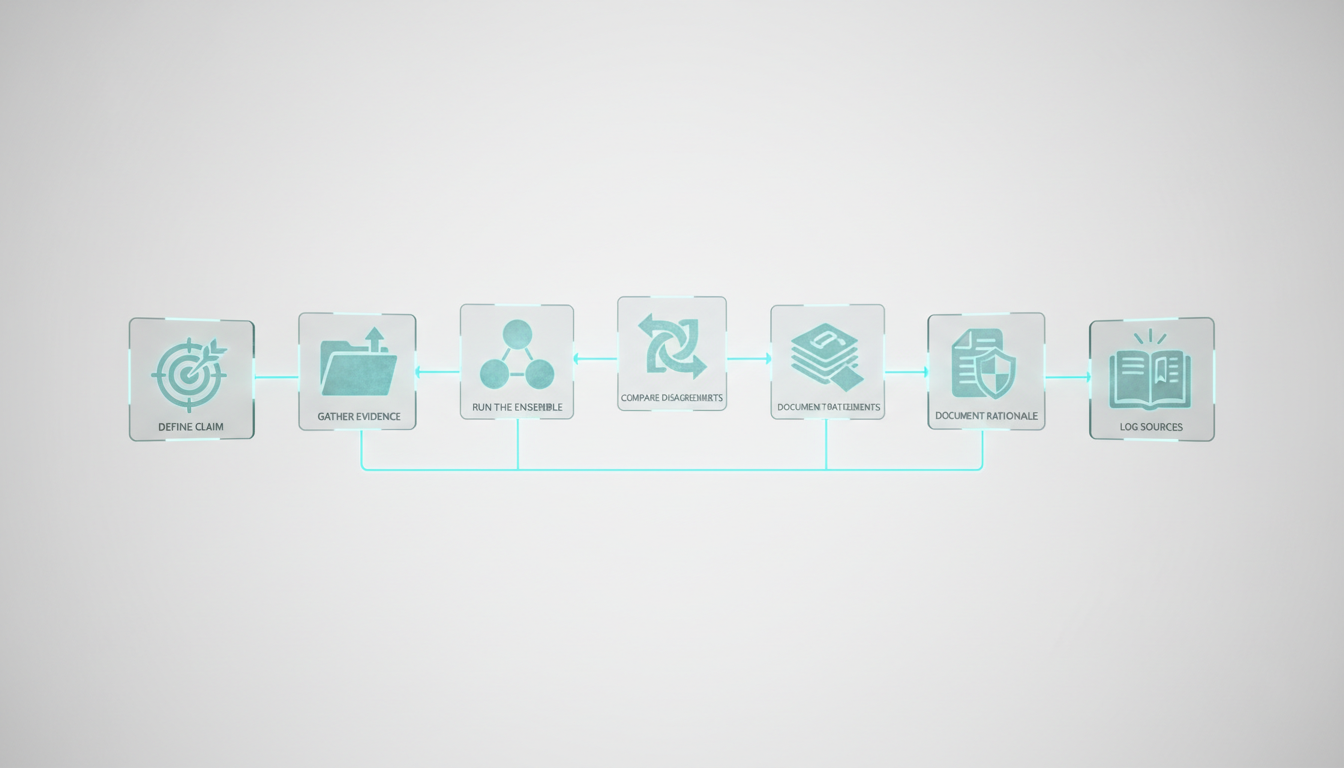
Orchestration platforms excel at decision validation – using AI to stress-test your thinking before you commit. Here’s a six-step process.
Define the Claim
State your hypothesis or decision clearly. “We should invest in Company X” or “This contract clause creates liability.”
Clarity matters. Vague claims produce vague validation. Be specific about what you’re testing.
Gather Evidence
Upload relevant documents. Pull in external data sources. Give the AI the same information you used to form your view.
The quality of validation depends on evidence completeness. Missing a key document skews results.
Run the Ensemble
Choose your orchestration mode. Fusion works for factual claims. Debate fits strategic decisions. Red team suits high-stakes outputs.
Ask the AI to evaluate your claim. Request supporting and opposing arguments. Demand citations.
Compare Disagreements
When models disagree, dig in. What assumptions differ? What evidence do they weigh differently? Where does uncertainty live?
Disagreement is signal, not noise. It shows you where your decision rests on judgment calls rather than facts.
Document Rationale
Capture the decision trail. What arguments did you consider? What evidence tipped the balance? What objections did you override?
This documentation protects you later. If the decision goes wrong, you can show your process was sound.
Log Sources
Record every source the AI referenced. Verify key citations yourself. Check that quotes are accurate and context isn’t distorted.
AI-generated citations fail more often than people expect. Treat them as leads to verify, not gospel.
Workflow Blueprints by Role
Different professionals need different orchestration patterns. Here are four role-specific blueprints.
Investment Thesis Validation
You’re evaluating a potential portfolio company. You need to validate investment theses across market, team, product, and financials.
Workflow:
- Upload pitch deck, financials, and competitive research
- Run debate mode: bull case vs. bear case
- Use research symphony to scan industry reports and news
- Build knowledge graph linking company to competitors, customers, and risks
- Generate investment memo with cited sources
- Red team the memo to surface objections
The output is a balanced view with documented assumptions. You see both sides before you invest.
Legal Memo Drafting
You’re writing a memo on contract interpretation. Accuracy and citations matter. You need legal analysis workflows that produce defensible work.
Workflow:
- Upload contracts, case law, and statutory text
- Extract key terms and obligations using targeted mode
- Run fusion mode to identify risks and ambiguities
- Generate draft memo with citations
- Red team the draft – attack weak arguments and unsupported claims
- Verify every citation manually
The platform accelerates research and drafting but doesn’t replace legal judgment. You review, revise, and sign off.
Due Diligence Across Documents
You’re conducting due diligence with multi-LLM ensembles on an acquisition target. You have hundreds of documents – contracts, financials, HR records, IP filings.
Workflow:
- Batch upload all documents to vector database
- Use research symphony to extract entities, dates, and obligations
- Build knowledge graph linking people, transactions, and assets
- Run targeted queries – “What change-of-control provisions exist?” “List all pending litigation”
- Generate diligence report with cross-document citations
- Flag inconsistencies where documents contradict
The graph reveals hidden connections. The vector search finds needles in haystacks. You complete diligence faster without missing critical details.
Market Research Synthesis
You’re mapping a new market. You need to synthesize competitor analysis, customer interviews, and industry reports into a coherent landscape view.
Workflow:
- Upload research reports, transcripts, and web scrapes
- Use sequential mode – extract themes, cluster competitors, identify gaps
- Build knowledge graph of market relationships
- Run debate mode on strategic questions – “Is this market consolidating or fragmenting?”
- Generate market map with supporting evidence
The platform helps you see patterns across disparate sources. You move from raw data to strategic insight faster.
Vendor Landscape Categories
The market divides into three categories. Each serves different needs.
Managed Platforms
These companies handle infrastructure, model routing, and updates. You focus on workflows, not plumbing.
Managed platforms suit teams that want to build a specialized AI team without managing infrastructure. You get new models automatically. The vendor handles scaling and uptime.
Trade-offs:
- Pros – fast time to value, minimal maintenance, regular updates
- Cons – less customization, vendor lock-in, recurring costs
Look for platforms with strong governance features if you handle sensitive data. Check their model lineup – do they support the LLMs you need?
Developer-First Frameworks
These tools give you building blocks – model APIs, orchestration primitives, and context stores. You assemble your own solution.
Frameworks suit engineering teams that need control. You can customize every aspect of orchestration. You own your data and infrastructure.
Trade-offs:
Watch this video about ai agent orchestration platform companies:
- Pros – full control, no vendor lock-in, cost efficiency at scale
- Cons – requires engineering resources, maintenance burden, slower iteration
Popular frameworks include LangChain, LlamaIndex, and Semantic Kernel. They’re open source with commercial support options.
Enterprise Suites
Large vendors bundle orchestration with compliance, governance, and enterprise IT integration. Think Microsoft, Google, AWS.
Enterprise suites fit organizations with strict security and compliance requirements. You get SOC 2, HIPAA, and FedRAMP certifications. The platform integrates with your existing identity and access management.
Trade-offs:
- Pros – enterprise-grade security, compliance certifications, IT integration
- Cons – higher cost, slower updates, complex procurement
Evaluate enterprise suites on governance features – audit trails, PII handling, data residency controls.
Build vs. Buy Decision Framework

Should you build your own orchestration system or buy a platform? The answer depends on team capability and workflow criticality.
When to Build
Build if you have:
- Strong engineering team comfortable with AI APIs
- Unique workflows that don’t fit standard patterns
- Strict data governance that prohibits third-party platforms
- Scale that makes per-query costs prohibitive
Building gives you control but requires ongoing maintenance. Model APIs change. Frameworks evolve. You need dedicated resources.
When to Buy
Buy if you have:
- Limited engineering capacity
- Standard workflows that platforms support well
- Need to move fast without infrastructure work
- Moderate scale where platform costs are reasonable
Platforms let you focus on workflows instead of plumbing. You get new features automatically. The vendor handles scaling and reliability.
Total Cost Calculation
Compare total cost of ownership over two years:
Build costs:
- Engineering time (design, implementation, testing)
- Infrastructure (compute, storage, monitoring)
- Maintenance (updates, bug fixes, model changes)
- Opportunity cost (what else could the team build?)
Buy costs:
- Platform subscription fees
- Per-query or token-based usage charges
- Integration and training time
- Migration risk if you switch vendors
Most teams underestimate build costs. Maintenance compounds over time. Model updates break things. What starts as a two-week project becomes a permanent tax on engineering.
Implementation Roadmap
Adopting orchestration platforms works best as a phased rollout. Start small, measure results, then scale.
Phase 1 – Pilot a Single Workflow
Pick one high-stakes workflow where decision quality matters. Investment memos, legal research, or competitive analysis work well.
Run the workflow through the platform for 30 days. Compare outputs to your traditional process. Measure:
- Accuracy – how often does the AI produce correct answers?
- Time saved – how much faster is the new workflow?
- Disagreement rate – how often do models disagree?
- Correction cost – how much time do you spend fixing errors?
Set success criteria upfront. “Reduce research time by 40% while maintaining accuracy” is measurable. “Make research better” is not.
Phase 2 – Expand to Team
If the pilot succeeds, roll out to your team. Create playbooks for common workflows. Define roles – who orchestrates, who reviews, who signs off.
Training matters. People need to understand orchestration modes, context management, and quality checks. Budget time for enablement.
Phase 3 – Build Quality Management
As usage grows, formalize quality controls:
- Prompt governance – standard templates for common queries
- Test suites – regression tests for critical workflows
- Model monitoring – track when model updates change outputs
- Feedback loops – capture what works and what fails
Quality management prevents drift. Without it, each person develops their own approach and results vary.
Phase 4 – Scale Across Workflows
Expand to additional use cases. Prioritize workflows where:
- Stakes are high and errors are costly
- Research is time-consuming and repetitive
- Multiple perspectives add value
- Audit trails are required
Not every task needs orchestration. Simple queries work fine with single models. Save orchestration for complex, high-value work.
Data Security and Governance Checklist
Before you upload sensitive documents, verify the platform’s security posture.
Data Handling
Ask vendors:
- Where is data stored? (region, jurisdiction)
- Is data encrypted at rest and in transit?
- Do you use customer data to train models?
- Can I delete my data on demand?
- What’s your data retention policy?
Read the terms of service carefully. Some platforms reserve rights to use your data. Others commit to zero retention.
Access Controls
Verify the platform supports:
- Role-based access control (RBAC)
- Single sign-on (SSO) integration
- Multi-factor authentication (MFA)
- Audit logs of who accessed what
- Data loss prevention (DLP) policies
For regulated industries, check compliance certifications – SOC 2, HIPAA, GDPR, ISO 27001.
Model Privacy
Understand how models handle your data:
- Are queries sent to third-party APIs?
- Do model providers see your data?
- Can you use self-hosted models?
- What PII detection is built in?
Some platforms route queries to OpenAI, Anthropic, or Google. Your data touches their systems. If that’s unacceptable, look for platforms that support on-premise deployment.
Audit Trails
High-stakes work requires documentation. The platform should log:
- Every query and response
- Which models were used
- What documents were referenced
- Who made the request
- When the request occurred
Audit trails protect you in disputes. If a decision is challenged, you can show your process.
Common Pitfalls to Avoid
Teams new to orchestration make predictable mistakes. Learn from others.
Expecting Perfection
AI orchestration improves decisions but doesn’t guarantee correctness. You still need human judgment. Treat AI outputs as drafts to verify, not final answers.
Skipping Verification
Always verify key facts and citations. Models hallucinate. They invent sources. They misquote documents. Spot-check aggressively, especially early on.
Ignoring Context Limits
Models have context windows – typically 32K to 200K tokens. Large documents get truncated. The AI might miss critical information buried on page 47.
Break large documents into chunks. Use vector search to find relevant sections. Don’t assume the model read everything.
Over-Orchestrating Simple Tasks
Not every query needs five models. Simple questions waste time and money with orchestration. Use targeted mode for routine work. Save ensembles for complex decisions.
Neglecting Prompt Engineering
Good prompts matter. Vague questions produce vague answers. Specify format, length, and sources. Give examples of good outputs.
Invest in prompt templates for common workflows. Standardization improves consistency.
Emerging Trends in Orchestration
The field evolves quickly. Watch these developments.
Specialized Models
General-purpose LLMs are giving way to specialized models. Legal-specific, code-specific, and medical models outperform generalists in their domains.
Orchestration platforms will route queries to specialist models automatically. Your legal question goes to a legal model. Your code review goes to a code model.
Agentic Workflows
Current platforms require human direction. Next-generation systems will plan and execute multi-step workflows autonomously.
You’ll define goals – “Analyze this company for acquisition” – and the platform will orchestrate research, document review, and synthesis without step-by-step guidance.
Continuous Learning
Platforms will learn from your feedback. When you correct an error or prefer one answer over another, the system adjusts future orchestration.
Your platform becomes personalized – tuned to your judgment, terminology, and priorities.
Multi-Modal Orchestration
Text-only orchestration is expanding to images, audio, and video. You’ll analyze slide decks, transcripts, and recordings alongside documents.
Multi-modal ensembles will cross-reference claims across formats. A statement in a pitch deck gets verified against the transcript of an earnings call.
Frequently Asked Questions
How do orchestration platforms reduce hallucinations?
By running queries across multiple models and comparing outputs. When models agree, confidence increases. When they disagree, you investigate. Cross-model corroboration catches errors that single-model queries miss. Red team mode actively searches for flaws in generated content.
What’s the latency penalty for multi-model queries?
Fusion and debate modes take 2-5x longer than single-model queries because multiple models run in parallel or sequence. For high-stakes decisions, the extra seconds are worth it. For routine queries, use targeted mode with a single model to minimize latency.
Can I use my own models with orchestration platforms?
Most managed platforms support major commercial models (GPT-4, Claude, Gemini). Some allow custom model integration via API. Developer frameworks give you full control – you can plug in any model, including self-hosted open-source options.
How much does orchestration cost compared to single-model chat?
Multi-model queries consume more tokens, so costs are higher. Fusion mode with five models costs roughly 5x a single query. Debate mode adds overhead for back-and-forth exchanges. Budget 3-10x single-model costs depending on orchestration complexity. The ROI comes from better decisions, not lower costs.
What happens to my data when I upload documents?
It depends on the platform. Some store documents in encrypted cloud storage and use them only for your queries. Others send excerpts to third-party model APIs. Read the privacy policy carefully. For sensitive data, choose platforms with on-premise deployment or zero-retention guarantees.
How do I measure ROI on orchestration platforms?
Track time saved, error reduction, and decision quality. Measure how much faster you complete research. Count how many errors you catch before they matter. Survey users on confidence in AI-assisted decisions. For high-stakes work, even a 10% improvement in decision quality justifies significant cost.
When should I build my own orchestration system instead of buying?
Build if you have strong engineering resources, unique workflows that platforms don’t support, strict data governance requirements, or scale that makes platform costs prohibitive. Buy if you want fast time to value, have standard workflows, or lack engineering capacity for ongoing maintenance.
How do I handle model updates that change outputs?
Maintain test suites with known-good queries and expected outputs. When models update, run your test suite and flag regressions. For critical workflows, pin to specific model versions until you can validate new outputs. Platforms with audit logs help you track when changes occurred.
Next Steps for Platform Evaluation
You now have a framework to evaluate AI agent orchestration platforms. The rubric, workflow blueprints, and governance checklist give you tools to compare vendors on what matters.
Start with a pilot. Pick one high-stakes workflow where decision quality matters. Run it through an orchestration platform for 30 days. Measure accuracy, time saved, and disagreement resolution. Let results guide your next steps.
Orchestration platforms convert model diversity into decision confidence. Modes, context, and control are the differentiators. Use the evaluation rubric to score vendors on your real workflows. Don’t optimize for cost – optimize for the quality of decisions you can’t afford to get wrong.


