A multi AI orchestration platform coordinates multiple language models to analyze problems from different angles. Instead of relying on a single AI’s perspective, these platforms run several models in parallel or sequence, then combine their outputs to reduce bias and increase confidence in high-stakes decisions.
Think of it as assembling a panel of experts rather than consulting just one advisor. Each model brings different training data, reasoning patterns, and strengths. The platform manages how they interact, preserves context across the conversation, and helps you validate conclusions before acting.
Traditional single-model chat tools give you one answer. An orchestration platform gives you validated consensus, identified disagreements, and documented reasoning paths you can audit later.
How Orchestration Differs from Single-Model Chat
Single-model interfaces send your prompt to one AI and return its response. The model’s biases become your blind spots. Its knowledge gaps become yours. You can’t easily compare alternative reasoning or catch errors without manually testing other tools.
Orchestration platforms route your query to multiple models simultaneously or in coordinated sequences. They manage the interaction patterns between models, aggregate results intelligently, and maintain persistent context so each conversation builds on previous exchanges.
- Single model: One perspective, one reasoning chain, no built-in validation
- Orchestration: Multiple perspectives, comparative analysis, structured validation loops
- Context handling: Orchestration preserves conversation history across sessions and models
- Auditability: Orchestration logs all model outputs and decision paths for review
Core Orchestration Modes and When to Use Each
Different tasks need different coordination patterns. A platform built for professionals offers multiple modes, each optimized for specific decision types and risk levels.
Sequential Mode
Sequential orchestration runs models one after another, with each building on the previous output. The first model generates initial analysis. The second refines or expands it. The third validates or critiques.
Use sequential mode when you need iterative refinement or want to apply specialized models at different stages. Legal teams use it to draft arguments, then stress-test them, then polish language. Research teams use it to extract findings from documents, synthesize themes, then generate citations.
Strengths: Clear progression, easy to understand each step, efficient token usage.
Risks: Early errors compound downstream, later models may defer to earlier outputs rather than challenge them.
Super Mind mode
Super Mind runs multiple models in parallel on the same prompt, then synthesizes their outputs into a unified response. The platform identifies common themes, reconciles conflicts, and produces a consolidated answer.
Use fusion when you want balanced consensus that incorporates diverse viewpoints. Investment analysts use it to reconcile bullish and bearish theses. Product teams use it to merge positioning ideas from different angles.
Strengths: Reduces individual model bias, surfaces majority and minority opinions.
Risks: Can create false consensus if fusion logic isn’t explicit, may smooth over important disagreements.
Debate Mode
Debate mode assigns opposing positions to different models and has them argue. One model makes a claim. Another challenges it. The first responds. The exchange continues for several rounds, with each model refining arguments based on the other’s points.
Use debate when you need to stress-test assumptions or explore trade-offs between competing options. Brand strategists use it to evaluate positioning alternatives. Researchers use it to challenge methodology choices.
Strengths: Uncovers weak reasoning, forces explicit justification of claims.
Risks: Models may argue for consistency rather than truth, debates can become circular without clear resolution criteria.
Red Team Mode
Red team orchestration tasks one set of models with defending a position while another set attacks it. The defending models build the strongest case possible. The attacking models identify every vulnerability, edge case, and counterargument.
Use red team for high-risk decisions where you must identify failure modes before committing. Legal teams use it to find weaknesses in briefs before filing. Due diligence teams use it to stress-test investment theses.
Strengths: Aggressive vulnerability discovery, prepares you for worst-case challenges.
Risks: Can overstate risks, may generate irrelevant edge cases.
Research Symphony Mode
Research Symphony coordinates models to work through large document sets systematically. Different models handle extraction, synthesis, cross-referencing, and citation generation. The platform manages task assignment and result aggregation.
Use research symphony when you need to process multiple sources and build comprehensive analysis. Academic researchers use it for literature reviews. Financial analysts use it to synthesize earnings calls, filings, and news.
Strengths: Handles scale efficiently, maintains consistency across sources.
Risks: Quality depends on clear task decomposition, can miss connections between distant sources.
Targeted Mode
Targeted orchestration assigns specific sub-tasks to specialist models based on their strengths. One model handles numerical analysis. Another processes legal language. A third manages creative generation. The platform routes each query component to the optimal model.
Use targeted mode when you have well-defined sub-tasks with clear model specializations. Technical teams use it to combine code generation, documentation, and testing. Marketing teams use it to separate data analysis from creative writing.
Strengths: Maximizes individual model strengths, efficient resource usage.
Risks: Requires understanding model capabilities, integration points can introduce errors.
Decision Framework: Choosing the Right Orchestration Mode
Select your orchestration mode based on three factors: decision risk, information complexity, and desired output type.
Decision Risk Assessment
High-risk decisions with significant consequences need aggressive validation. Use Red Team or Debate modes to identify vulnerabilities before committing. Medium-risk decisions benefit from Super Mind to balance perspectives. Low-risk exploratory work can use Sequential for efficiency.
- High risk: Legal filings, major investments, regulatory submissions → Red Team or Debate
- Medium risk: Strategic recommendations, product positioning → Super Mind or Debate
- Low risk: Research summaries, content drafts → Sequential or Targeted
Information Complexity Mapping
Simple single-source tasks work with Sequential mode. Multiple conflicting sources need Super Mind to reconcile differences. Large document sets require Research Symphony for systematic processing. Tasks with distinct specialized components benefit from Targeted routing.
- Count your information sources and assess their agreement level
- Identify whether sources conflict, complement, or build on each other
- Choose the mode that best handles your source pattern
Output Type Requirements
Different outputs need different orchestration approaches. If you need a single synthesized answer, use Super Mind. If you need to see competing perspectives, use Debate. If you need systematic coverage of a large domain, use Research Symphony.
Match your output requirements to mode capabilities:
- Unified recommendation: Super Mind mode aggregates multiple perspectives
- Comparative analysis: Debate mode surfaces trade-offs explicitly
- Vulnerability report: Red Team mode lists all identified risks
- Comprehensive synthesis: Research Symphony mode covers all sources systematically
Essential Platform Components for Professional Orchestration
Effective orchestration requires more than just running multiple models. Professional platforms provide infrastructure for context management, knowledge organization, and process control.
Prompt Routing and Model Selection
The platform must intelligently route queries to appropriate models based on task type, required capabilities, and cost constraints. Basic routing uses rules you define. Advanced routing learns from your preferences and outcomes over time.
Good routing systems let you specify fallback models when primary choices are unavailable. They track model performance on different task types and suggest optimizations. They enforce constraints like cost limits or latency requirements.
Context Persistence and Memory Management
Professional work happens across multiple sessions over days or weeks. The platform needs to maintain context between conversations so you don’t repeat background information every time. Context Fabric systems preserve conversation history, document references, and decision rationale across sessions.
Context management includes scoping controls to prevent information leakage between projects. You define workspace boundaries. The platform enforces them. Models only see context from the current workspace, protecting confidentiality and reducing noise.
- Persistent conversation history across sessions
- Document reference tracking with version control
- Workspace isolation for project boundaries
- Selective context injection based on relevance
Knowledge Graph Integration
A Knowledge Graph maps relationships between concepts, documents, and decisions. When you reference a term, the platform understands its connections to other elements in your workspace. This enables disambiguation, citation linking, and discovery of related information.
Knowledge graphs improve over time as you work. They learn your domain terminology, track how concepts relate, and surface relevant connections automatically. This reduces prompt engineering burden and improves consistency across team members.
Vector Database and RAG Workflows
Vector databases store semantic representations of your documents and conversations. When you ask a question, the platform retrieves relevant chunks based on meaning rather than keyword matching. This powers Retrieval-Augmented Generation (RAG) workflows that ground model outputs in your actual documents.
RAG reduces hallucination by giving models direct access to source material. It enables citation generation by tracking which document chunks informed each part of the response. It scales to large document collections without requiring full reprocessing for every query.
Audit Logging and Reproducibility
Professional decisions need documentation. The platform must log every model output, every orchestration decision, and every human intervention. These logs enable audit trails, support reproducibility, and help teams learn from past decisions.
Audit logs capture:
- Input prompts with full context
- Model selection rationale
- Individual model outputs before aggregation
- Super Mind or synthesis logic applied
- Final delivered response
- Human edits or overrides
Conversation Control Features
Real-time control over orchestration processes matters when you realize mid-generation that you need to adjust course. Conversation Control features let you stop generation, interrupt models, queue follow-up messages, and adjust response detail levels on the fly.
Stop and interrupt capabilities prevent wasted resources when you spot an issue early. Message queuing lets you prepare follow-ups while models work. Response detail controls let you request quick summaries or comprehensive analysis as needed.
Architectural Patterns for Multi-Model Orchestration
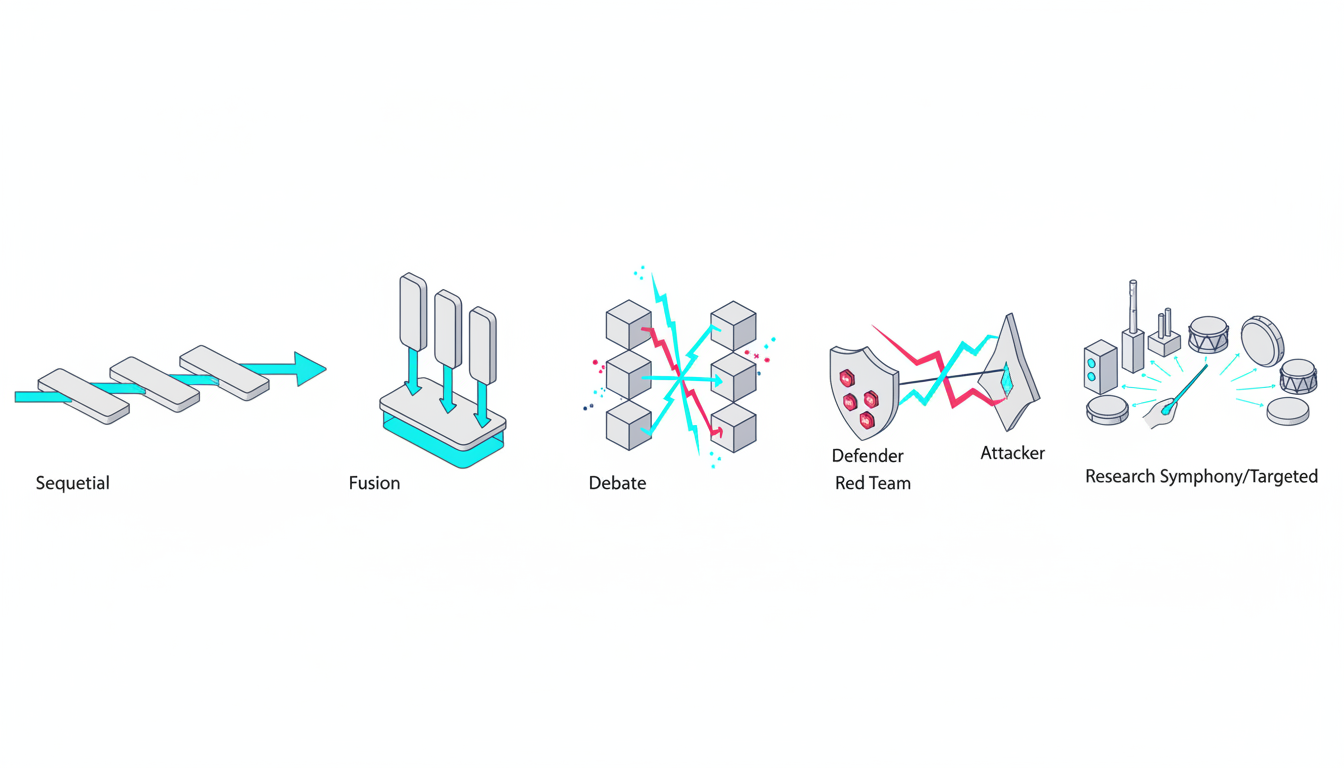
How you structure model interactions affects both output quality and operational efficiency. Different patterns suit different use cases.
Parallel Orchestration
Parallel patterns run multiple models simultaneously on the same input. Results arrive at roughly the same time. The platform aggregates them according to your fusion rules. This pattern minimizes latency when you need multiple perspectives quickly.
Watch this video about multi ai orchestration platform for professionals:
Use parallel orchestration for time-sensitive decisions where you can’t afford sequential processing delays. The 5-Model AI Boardroom approach runs five different models in parallel, giving you diverse perspectives within seconds.
Trade-offs: Higher token cost, potential for redundant processing, aggregation complexity.
Sequential Orchestration
Sequential patterns chain models in series. Each model’s output becomes input for the next. This enables iterative refinement and progressive specialization. Use sequential orchestration when later stages depend on earlier results or when you want to apply different model strengths at different phases.
Legal teams often use three-stage sequential orchestration: draft generation, argument validation, language polishing. Each stage uses models optimized for that specific task.
Trade-offs: Longer latency, error propagation risk, clear progression visibility.
Hybrid Mode Switching
Sophisticated platforms let you switch modes mid-conversation based on what you discover. Start with Super Mind to get initial consensus. If you spot concerning assumptions, switch to Red Team to stress-test them. If you need deeper exploration of a specific angle, switch to Targeted mode for specialized analysis.
Mode switching requires the platform to maintain context across mode transitions. Your conversation history, document references, and intermediate conclusions carry forward. This enables exploratory workflows that adapt to what you learn.
Human-in-the-Loop Checkpoints
Professional workflows need human judgment at key decision points. The platform should pause for your input when models disagree significantly, when confidence scores fall below thresholds, or when specific validation criteria aren’t met.
Define checkpoint triggers explicitly:
- Model disagreement exceeds 30% on key claims
- Confidence scores below 0.7 for critical facts
- Citations missing for regulatory requirements
- Cost exceeds budget threshold for the query
Evaluation Framework: Assessing Orchestration Platforms
Choose an orchestration platform using objective criteria tied to your professional outcomes. Build a scoring rubric weighted by what matters most to your role and team.
Bias Reduction and Decision Confidence
The primary value of orchestration is reducing single-model bias. Evaluate how platforms help you identify and mitigate bias. Look for features that surface disagreements, track confidence levels, and document reasoning paths.
Test with known-answer questions where single models often fail. Compare how different orchestration modes handle edge cases, controversial topics, and ambiguous scenarios. Measure whether multi-model outputs actually reduce error rates in your domain.
Scoring criteria:
- Disagreement detection and reporting (0-5 scale)
- Confidence scoring transparency (0-5 scale)
- Bias mitigation documentation (0-5 scale)
- Empirical error reduction in your test cases (0-5 scale)
Reproducibility and Auditability
Professional decisions need documentation. Evaluate whether you can recreate past analyses, understand how conclusions were reached, and provide audit trails when required.
Test reproducibility by running the same query multiple times with identical settings. Check whether you get consistent results. Examine audit logs to see if they capture enough detail to reconstruct the decision process. Verify that you can export logs in formats your compliance team accepts.
- Reproducibility: Can you get the same result with the same inputs?
- Audit trail completeness: Do logs capture all decision factors?
- Export capabilities: Can you extract data for compliance reviews?
- Version control: Does the platform track changes over time?
Governance and Access Control
Enterprise teams need role-based permissions, workspace isolation, and data handling controls. Evaluate whether the platform supports your security requirements without creating friction for daily work.
Check for granular permission controls. Verify workspace isolation prevents cross-project information leakage. Confirm data handling policies meet your compliance requirements. Test whether access controls integrate with your existing identity management systems.
Mode Breadth and Flexibility
More orchestration modes give you more tools for different situations. Evaluate the range of available modes and how easily you can switch between them. Check whether you can customize modes or create new orchestration patterns for specialized needs.
Test each mode with realistic scenarios from your work. Assess whether mode implementations actually deliver their promised benefits. Verify that mode switching preserves context appropriately.
Integration Capabilities
Professional work involves multiple tools and data sources. Evaluate how well the platform integrates with your existing systems. Check for API access, webhook support, and connectors to common enterprise tools.
Key integration points to evaluate:
- Document management systems and cloud storage
- Data sources and databases
- Collaboration tools and communication platforms
- Analytics and reporting systems
- Custom internal tools via API
Team Collaboration Features
If multiple people use the platform, evaluate collaboration capabilities. Check for shared workspaces, conversation handoffs, annotation tools, and version control. Verify that team members can build on each other’s work without duplicating effort.
Test how the platform handles concurrent work on the same project. Verify that changes are tracked and conflicts are handled gracefully. Check whether you can assign review tasks and track completion.
Cost Transparency and Predictability
Orchestration uses more tokens than single-model chat. Evaluate whether the platform provides clear cost visibility and controls. Check for budget alerts, usage analytics, and optimization suggestions.
Understand the pricing model completely. Verify whether costs scale linearly with usage or if there are volume discounts. Check for hidden fees on features you need. Test whether cost controls actually prevent budget overruns.
Implementation Playbooks by Professional Role
Different roles need different orchestration patterns. These playbooks provide starting points based on common professional workflows.
Legal Professionals: Argument Validation Workflow
Legal work demands rigorous argument validation before filing. Use orchestration to stress-test briefs, identify counterarguments, and ensure citation accuracy.
Recommended workflow:
- Use Sequential mode to draft initial arguments from case facts
- Switch to Red Team mode to identify weaknesses and counterarguments
- Apply Debate mode to develop responses to anticipated challenges
- Use Knowledge Graph to verify citations and precedent connections
- Generate final brief with Master Document Generator for version control
This workflow helps you find argument vulnerabilities before opposing counsel does. The audit trail documents your reasoning process. Citations link directly to source material through the knowledge graph.
Investment Analysts: Multi-Source Research Synthesis
Investment decisions require synthesizing information from earnings calls, filings, news, and industry reports. Use orchestration to process sources systematically and identify consensus vs outlier views.
Recommended workflow:
- Use Research Symphony mode to extract key points from all source documents
- Apply Super Mind mode to reconcile bullish and bearish indicators
- Use Debate mode to stress-test your investment thesis
- Generate investment memo with full citation trail for IC presentation
- Maintain persistent context for follow-up questions during due diligence
This approach surfaces disagreements between sources explicitly. You see where data conflicts rather than getting a smoothed average. The audit trail supports your investment committee presentation.
Researchers and Academics: Literature Review Protocol
Academic research requires comprehensive literature coverage, accurate citations, and reproducible methodology. Use orchestration to process large paper sets while maintaining scholarly standards.
Recommended workflow:
- Use Research Symphony mode to extract findings from paper PDFs systematically
- Apply Targeted mode with specialized models for methodology and results sections
- Use Knowledge Graph to map relationships between papers and concepts
- Generate synthesis with full citation tracking via vector database
- Export reproducible protocol including model versions and prompts used
This workflow ensures comprehensive coverage without missing key papers. Citations link to specific passages in source documents. The exported protocol enables other researchers to reproduce your analysis.
Product Marketing: Positioning Development
Product positioning requires exploring multiple angles, validating messaging with different audience segments, and maintaining consistency across materials. Use orchestration to develop and test positioning systematically.
Recommended workflow:
- Use Debate mode to explore competing positioning angles
- Apply Super Mind mode to synthesize insights into unified messaging
- Use Targeted mode to adapt messaging for different channels and audiences
- Generate versioned outputs for stakeholder review with Living Document feature
- Maintain context across positioning iterations to track evolution
This approach helps you explore positioning space thoroughly before committing. Debate mode surfaces trade-offs between different angles. Versioning tracks how messaging evolved based on feedback.
Governance, Security, and Compliance Considerations
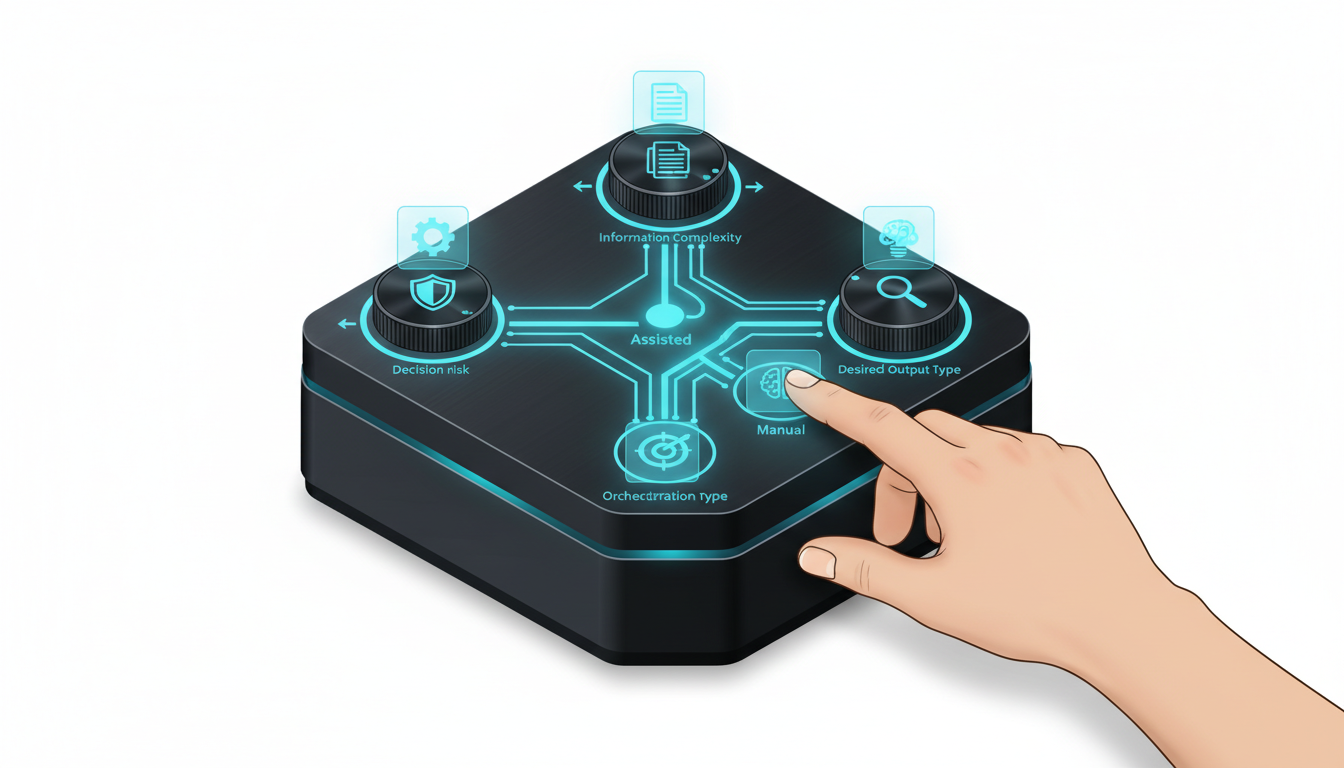
Professional orchestration platforms must meet enterprise security and compliance requirements. Evaluate these factors carefully before adopting a platform.
Data Handling and Privacy
Understand where your data goes when you use the platform. Check whether inputs are used for model training. Verify data retention policies. Confirm deletion capabilities when projects end.
Key questions to answer:
- Are inputs used to train or improve models?
- Where is data stored geographically?
- How long is data retained?
- Can you delete all data associated with a project?
- Are there options for on-premise or private cloud deployment?
Access Control and Permissions
Enterprise teams need granular control over who can access what. Evaluate role-based access controls, workspace permissions, and audit logging of access events.
Implement least-privilege access. Users should only see workspaces and features necessary for their role. Administrators need visibility into all activity for compliance purposes. The platform should integrate with your existing identity provider.
Model Policy and Constraints
Define which models can be used for which types of data. Some models may be acceptable for public information but not for confidential data. Some tasks may require models meeting specific certification standards.
Your model policy should specify:
- Approved models for each data classification level
- Fallback models when primary choices are unavailable
- Cost constraints and budget alerts
- Performance requirements and timeout limits
- Prohibited use cases or data types
Audit Logging and Compliance Reporting
Maintain comprehensive logs of all platform activity. Track who accessed what, which models were used, what outputs were generated, and how results were used in downstream decisions.
Your audit logs should support compliance requirements in your industry. Financial services may need records for regulatory examinations. Healthcare may need HIPAA-compliant logging. Legal teams may need records for discovery requests.
Version Control and Change Management
Track changes to prompts, orchestration configurations, and model selections over time. When outputs change, you need to understand whether it’s due to different inputs, different models, or different orchestration logic.
Implement formal change management for production orchestration workflows. Test changes in staging environments. Document rationale for configuration updates. Maintain rollback capabilities when changes cause issues.
Integration Strategies for Document Sources and Data Systems
Orchestration platforms become more valuable when connected to your existing information systems. Plan integrations carefully to maximize utility while maintaining security.
Document Management Integration
Connect your document repositories to enable RAG workflows. The platform should index documents, extract semantic embeddings, and retrieve relevant chunks based on query context.
Support for common document formats matters. Verify the platform handles PDFs, Word documents, spreadsheets, and presentations. Check whether it preserves formatting, extracts tables correctly, and maintains document structure.
API and Data Source Connections
Professional work often requires real-time data from APIs or databases. Evaluate whether the platform can query external systems during orchestration, incorporate results into context, and refresh data as needed.
Common integration needs:
- Financial data APIs for market information
- CRM systems for customer data
- Internal databases for proprietary information
- Research databases for academic papers
- News and media APIs for current events
Webhook and Event-Driven Workflows
Some use cases benefit from automated orchestration triggered by external events. Check whether the platform supports webhooks, scheduled jobs, and integration with workflow automation tools.
Event-driven orchestration enables automated monitoring, scheduled analysis, and integration with existing business processes. You can trigger orchestration when new documents arrive, when data thresholds are crossed, or on regular schedules.
Watch this video about agentic ai orchestration platform:
ROI Measurement and Performance Metrics
Justify orchestration investment by tracking concrete improvements in decision quality, efficiency, and team consistency. Define metrics before implementation so you can measure actual impact.
Decision Quality Metrics
Measure whether orchestration actually improves decision outcomes. Track error rates, rework frequency, and downstream corrections needed. Compare decisions made with orchestration vs single-model approaches.
Key metrics:
- Error reduction rate: Percentage decrease in decisions requiring correction
- Confidence delta: Increase in decision confidence scores pre vs post orchestration
- Bias detection rate: Frequency of catching single-model errors through multi-model validation
- Downstream impact: Reduction in negative consequences from poor decisions
Efficiency and Throughput Metrics
Orchestration adds upfront processing time but should reduce overall cycle time by catching issues early. Measure time-to-insight, rework cycles, and throughput improvements.
Track these efficiency indicators:
- Time-to-first-insight: How quickly you get initial analysis
- Rework reduction: Fewer cycles needed to reach acceptable quality
- Analysis throughput: More decisions validated per time period
- Context reuse: Time saved by persistent context vs rebuilding from scratch
Team Consistency Metrics
Orchestration should improve consistency across team members. Junior analysts should produce work closer to senior quality. Different team members analyzing the same situation should reach similar conclusions more often.
Measure consistency through:
- Inter-analyst agreement rates on the same cases
- Quality variance between junior and senior team members
- Reproducibility of analysis when repeated by different people
- Standardization of methodology and documentation
Cost-Benefit Analysis Framework
Calculate total cost of orchestration including platform fees, increased token usage, and learning curve time. Compare against benefits from reduced errors, faster throughput, and better decisions.
Build a simple ROI model:
- Estimate cost per decision with orchestration (platform fees + tokens + time)
- Estimate cost per decision with single-model approach (tool fees + time + error costs)
- Factor in error reduction value (what does catching one major mistake save?)
- Calculate break-even point and expected ROI over 12 months
Common Pitfalls and How to Avoid Them
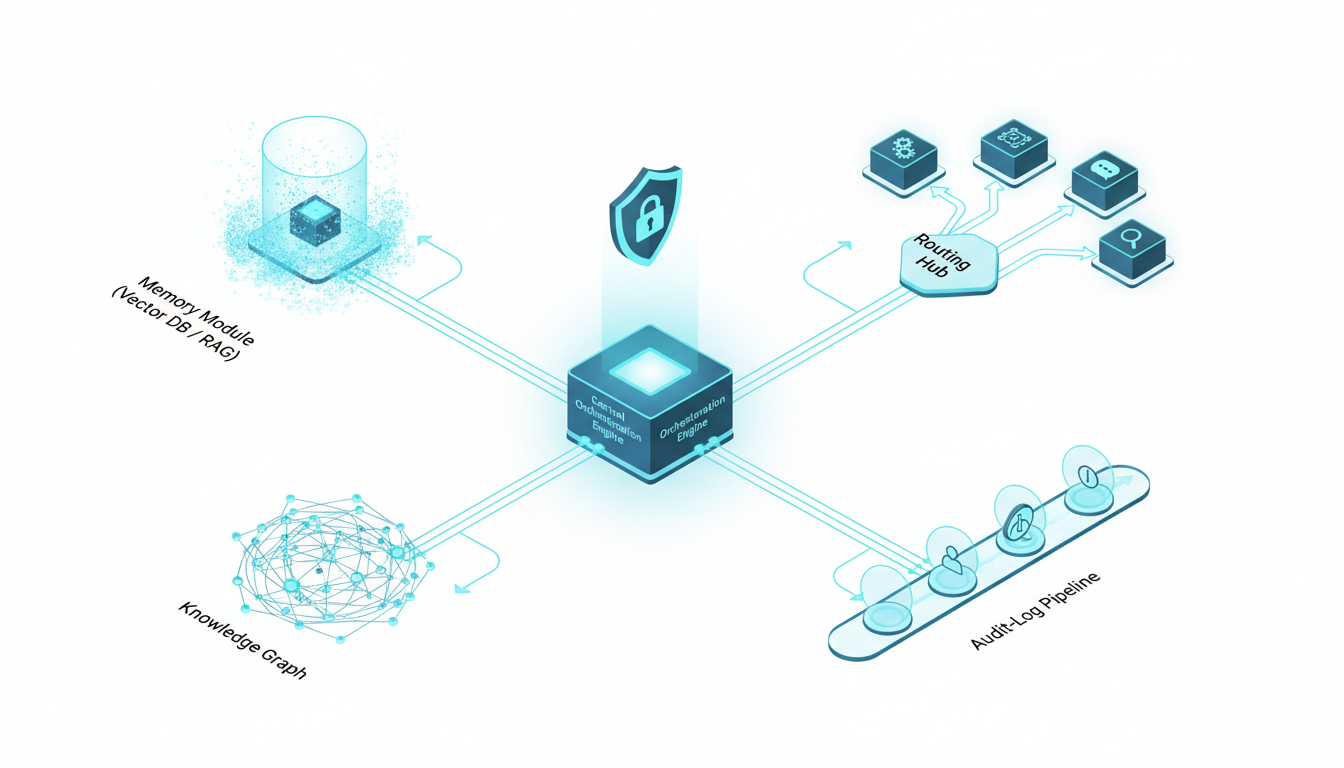
Teams new to orchestration make predictable mistakes. Learn from others to avoid these common failure modes.
Over-Orchestrating Simple Tasks
Not every query needs five models debating the answer. Simple fact lookups, routine formatting tasks, and low-stakes exploration work fine with single models. Reserve orchestration for decisions where the added validation actually matters.
Define clear criteria for when to use orchestration vs single-model chat. Consider decision stakes, information complexity, and downstream impact. Don’t orchestrate out of habit.
Inadequate Context Scoping
Poor context boundaries cause information leakage between projects or overwhelm models with irrelevant history. Define workspace boundaries explicitly. Scope context to what’s actually relevant for the current task.
Implement these context hygiene practices:
- Create separate workspaces for different clients or projects
- Archive completed conversations to reduce active context size
- Tag conversations by topic so retrieval stays relevant
- Review context summaries before starting new analysis threads
Missing Audit Trail Documentation
You can’t audit what you don’t log. Ensure audit logging is enabled from day one. Define retention policies that meet your compliance requirements. Implement regular audit log reviews to catch issues early.
Critical items to log:
- Full input prompts with context
- Model selection rationale and fallback events
- Individual model outputs before aggregation
- Super Mind or synthesis logic applied
- Final delivered outputs
- Human edits or overrides with justification
Untested Super Mind Strategies
Super Mind mode can create false consensus if aggregation logic isn’t explicit. Don’t assume averaging outputs produces good results. Test your fusion strategy with known-answer questions. Verify that it actually improves accuracy rather than just smoothing over disagreements.
Implement explicit fusion rules:
- Define how to handle majority vs minority opinions
- Specify confidence thresholds for accepting consensus
- Establish tie-break procedures when models split evenly
- Flag cases where fusion confidence is below acceptable levels
Ignoring Model Updates and Drift
Language models change frequently. Updates can shift outputs even with identical inputs. Monitor for drift. Test orchestration workflows after model updates. Maintain version control so you can compare outputs across model versions.
Implement a model update protocol:
- Subscribe to model provider update notifications
- Maintain test cases with known correct answers
- Run regression tests after model updates
- Document any output changes and assess impact
- Update orchestration configurations if needed
Best Practices for Professional Orchestration
These practices help teams get maximum value from orchestration platforms while avoiding common mistakes.
Start with High-Stakes Validation
Introduce orchestration where it delivers the most value: high-risk decisions with significant consequences. Use Debate or Red Team modes to stress-test critical analyses before committing. Build confidence in the approach with clear wins.
Identify your highest-risk decision types. Apply orchestration there first. Measure impact carefully. Expand to other use cases after proving value on the most important work.
Define Explicit Super Mind and Aggregation Rules
Don’t rely on platform defaults for combining model outputs. Define your own fusion logic based on your quality standards. Specify how to handle disagreements, weight different perspectives, and escalate to humans when needed.
Document your aggregation rules:
- Minimum confidence thresholds for accepting outputs
- Disagreement levels that trigger human review
- Weighting schemes for different model types
- Tie-break procedures and escalation paths
Maintain Persistent Context with Clear Boundaries
Use context persistence to reduce repetitive prompting and maintain conversation flow. But define workspace boundaries explicitly to prevent information leakage. Create separate contexts for different clients, projects, or sensitivity levels.
Implement context management discipline:
- Create workspaces at project initiation
- Define access controls and permissions immediately
- Archive completed conversations to reduce noise
- Review context summaries before starting new threads
- Delete workspaces when projects end
Formalize Human-in-the-Loop Checkpoints
Identify decision points where human judgment is non-negotiable. Configure the platform to pause and request input at these checkpoints. Don’t let orchestration run fully automated for high-stakes work.
Common checkpoint triggers:
- Model disagreement exceeds defined threshold
- Confidence scores fall below minimum acceptable level
- Cost exceeds budget allocation for the query
- Sensitive data is detected in inputs or outputs
- Regulatory compliance checks flag potential issues
Build Reproducible Workflows with Version Control
Professional work requires reproducibility. Version control your orchestration configurations, prompts, and model selections. When you repeat an analysis, you should be able to recreate previous results or understand why they changed.
Maintain version control for:
- Orchestration mode configurations and parameters
- Prompt templates and system instructions
- Model selections and fallback chains
- Super Mind rules and aggregation logic
- Integration configurations and data sources
Frequently Asked Questions
When should I use Debate mode instead of Red Team mode?
Use Debate when you want to explore trade-offs between competing options with roughly equal merit. Debate helps you understand the strengths and weaknesses of different approaches. Use Red Team when you have a specific position to defend and need aggressive vulnerability testing. Red Team assumes you’ve already chosen a direction and want to find every possible flaw before committing.
How do I ensure proper citations and auditability in orchestrated outputs?
Enable citation tracking in your vector database configuration. Use Knowledge Graph features to link claims to source documents. Configure audit logging to capture all model outputs before aggregation. Export conversation histories with full context when you need compliance documentation. Verify that citations include specific page numbers or sections rather than just document names.
What overhead should I expect from running multiple models simultaneously?
Token costs scale roughly linearly with the number of models used. Five models cost about five times as much as one model for the same query. Latency depends on whether you run models in parallel or sequence. Parallel orchestration takes as long as the slowest model. Sequential orchestration adds latencies together. The overhead is worth it for high-stakes decisions but wasteful for routine tasks.
How can I maintain consistent outputs across my team?
Share orchestration configurations and prompt templates across the team. Use workspace templates for common project types. Implement review processes where senior team members validate junior work. Track inter-analyst agreement rates and investigate when consistency drops. Consider building custom orchestration modes for your most common workflows to standardize methodology.
What happens when models disagree significantly?
Configure disagreement thresholds that trigger human review. The platform should flag cases where models split on key claims. Review the individual model outputs to understand the source of disagreement. Decide whether to gather more information, apply different orchestration modes, or make a judgment call based on your domain expertise. Document your decision rationale in the audit log.
How do I choose which models to include in my orchestration?
Select models with different training approaches, strengths, and known biases. Avoid using multiple models from the same family. Test model combinations on representative tasks from your domain. Track which combinations produce the best results for different task types. Update your model selections as new models become available and old ones are deprecated.
Can I customize orchestration modes for my specific workflow?
Advanced platforms allow custom mode creation. You can define routing logic, aggregation rules, and interaction patterns tailored to your needs. Start with standard modes and customize only when you identify clear gaps. Document custom modes thoroughly so team members understand when and how to use them.
How do I handle sensitive or confidential information in orchestration?
Use platforms with strong data governance controls. Verify that sensitive data stays within your organization’s boundaries. Consider on-premise or private cloud deployment for highly confidential work. Implement access controls and workspace isolation. Configure audit logging to track all access to sensitive information. Have clear data retention and deletion policies.
Moving Forward with Multi-AI Orchestration
Multi-AI orchestration platforms give professionals tools to validate high-stakes decisions with confidence. By coordinating multiple models through structured modes, maintaining persistent context, and providing comprehensive audit trails, these platforms reduce bias and increase reliability for critical work.
The key differentiators that matter:
- Multiple orchestration modes let you match coordination patterns to decision risk and information complexity
- Persistent context management reduces repetitive prompting and maintains conversation flow across sessions
- Knowledge graph integration enables citation tracking and relationship mapping
- Comprehensive audit logging supports reproducibility and compliance requirements
- Conversation control features give you real-time influence over orchestration processes
Start by identifying your highest-risk decisions. Apply orchestration there first with Debate or Red Team modes. Measure impact on decision quality and error rates. Expand to additional use cases after proving value on critical work.
Build evaluation rubrics weighted by what matters most to your role. Test platforms with realistic scenarios from your domain. Verify that governance and security controls meet your compliance requirements. Plan integrations with existing document and data systems carefully.
Avoid common pitfalls by defining clear orchestration criteria, maintaining proper context boundaries, implementing explicit fusion rules, and formalizing human-in-the-loop checkpoints. Version control your configurations and track performance metrics to demonstrate ROI.
Explore how these orchestration components map to your current workflows in the features overview, or learn more about building specialized AI teams for your specific use cases.