Ship automation that won’t break on edge cases. That’s the real challenge with AI workflows – they work perfectly in demos and fail in production when real variability hits.
Most AI automations collapse because teams skip the hard parts. They don’t design for hallucinations, silent errors, or untracked changes. The result? Systems that erode trust instead of building it.
This guide shows you how to design AI workflows with cross-verification, approval gates, and observability. You’ll learn when to use AI versus traditional automation, how to build safety into your architecture, and how to measure what matters. Start small, prove reliability, then scale.
What AI Workflow Automation Actually Means
AI workflow automation orchestrates multiple steps using AI models to handle unstructured data and judgment calls. It’s not the same as task automation or RPA.
Here’s the difference:
- Task automation handles single, repeatable actions with fixed rules
- RPA mimics human clicks through structured interfaces
- AI workflow automation chains AI decisions across variable inputs
Use AI when your process involves interpreting documents, making contextual decisions, or handling high variability. Skip AI when you have structured data and fixed rules – RPA is faster and cheaper.
When AI Makes Sense
AI workflow automation works best for these scenarios:
- Processing unstructured documents like contracts, emails, or research papers
- Making judgment calls that require context and nuance
- Handling variable inputs that don’t fit rigid templates
- Extracting meaning from natural language
The key indicator: if a human would need to read, interpret, and decide, AI can help. If it’s just data entry or clicking buttons, stick with RPA.
When AI Creates Risk
Don’t automate with AI when mistakes carry serious consequences without verification:
- Legal documents that create binding obligations
- Financial transactions that can’t be reversed
- PII handling without audit trails
- Medical decisions without human oversight
These scenarios need human-in-the-loop gates at risk inflection points. Automation can prepare the work, but humans approve the action.
Architecture Building Blocks
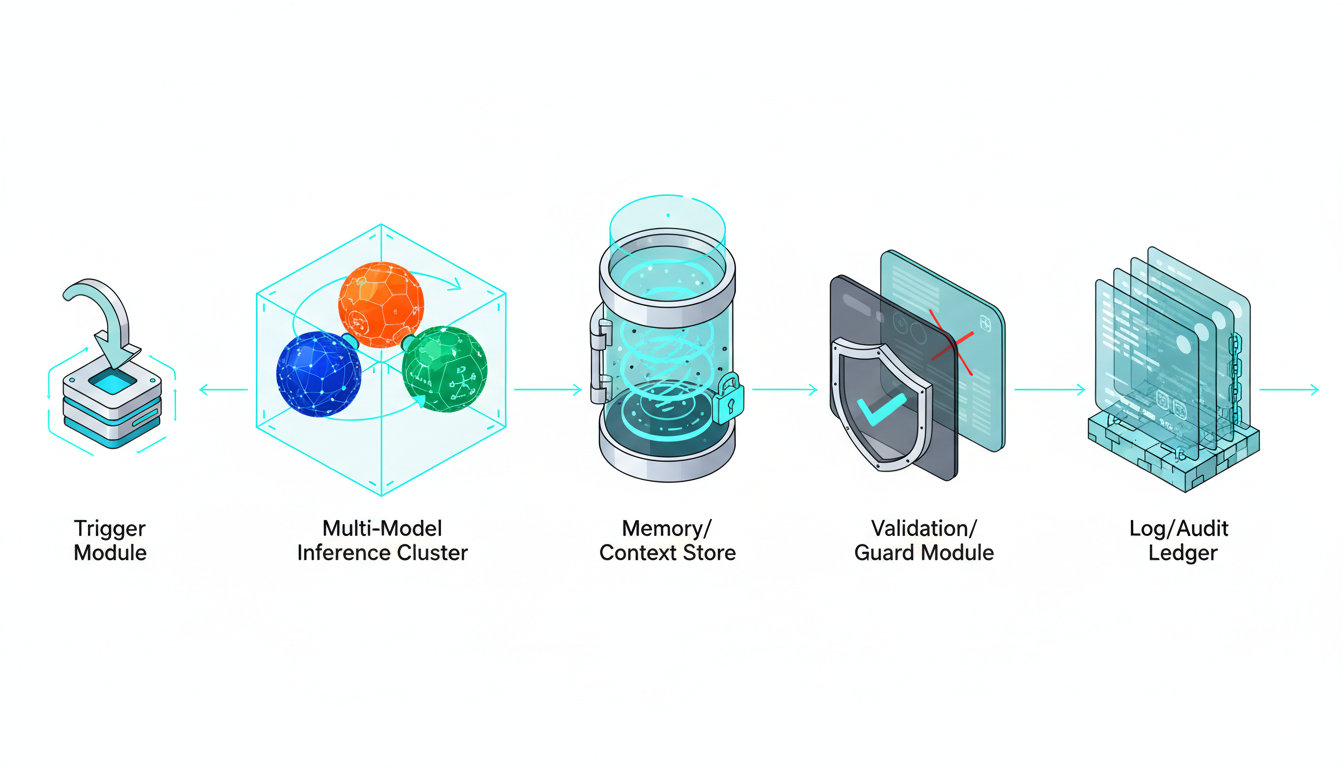
Every reliable AI workflow needs these components working together. Skip one and you’re building on sand.
Core Components
Your architecture must include:
- Triggers – what starts the workflow (webhook, schedule, user action)
- Models – which AI handles which step
- Tools – APIs and connectors for external systems
- Memory – context storage between steps
- Validations – checks that catch errors before they propagate
- Logs – audit trails for every decision
These aren’t optional. Each component protects against a different failure mode.
The Verification Layer
Single AI models hallucinate. They miss edge cases. They have blind spots based on training data.
The solution? Cross-verification using multiple models. When models disagree, you’ve found a problem worth human attention. See cross-verification in action for accuracy-critical work.
This approach treats disagreement as signal, not noise. If five frontier models reach consensus, confidence is high. If they split, flag for review.
Design Your AI Workflow Step by Step
Follow this process to build workflows that survive production.
Map the Process First
Before touching any AI tools, document your current process:
- What triggers the work?
- What decisions get made at each step?
- Where do errors happen today?
- Which steps have irreversible consequences?
- What outputs matter most?
Mark every decision point where humans currently apply judgment. These are your automation candidates.
Choose Your Automation Mode
Not every step needs AI. Mix approaches based on data type and risk:
- RPA for structured data entry and system navigation
- AI for document interpretation and contextual decisions
- Hybrid for processes that need both
A contract review workflow might use RPA to pull documents from email, AI to extract clauses, and human approval before updating the CRM. That’s three automation modes in one workflow.
Build Safety Into the Design
Add approval gates at risk inflection points. Use these criteria:
- Impact – how bad if wrong?
- Reversibility – can you undo it?
- Confidence – how certain is the AI?
High impact plus low reversibility equals mandatory human approval. No exceptions.
Your fallback patterns should include:
- Return to human when confidence drops below threshold
- Ask for clarification instead of guessing
- Rerun with alternate model if first attempt fails
- Log disagreements for later analysis
Model Strategy and Orchestration
Single models work for low-stakes tasks. High-stakes decisions need multi-model orchestration.
The difference matters. Parallel queries give you multiple opinions. Sequential orchestration builds context – each model sees previous responses and adds its perspective.
For professionals exploring multi-model approaches, learn how orchestration works with five frontier models working in sequence.
When models disagree, you have three options:
- Flag for human review (safest)
- Use majority consensus (faster)
- Weight by model confidence scores (most nuanced)
Pick based on your error budget. If mistakes are expensive, always flag disagreements.
Tooling and Integration
Your workflow needs connections to existing systems:
- API connectors for CRM, email, databases
- Document storage with version control
- Vector databases for semantic search
- Governance tools for PII and compliance
Every integration point is a failure point. Test error handling for network issues, rate limits, and data format mismatches.
Validation and Quality Controls
Build validation into every step:
- Schema checks – does output match expected format?
- Reference lookups – do extracted values exist in master data?
- Confidence scores – is the model certain enough?
- Disagreement metrics – how much do models diverge?
Set thresholds before deployment. If confidence drops below 0.8, route to human. If disagreement exceeds 30%, flag for review.
Watch this video about AI workflow automation:
Watch this video about AI workflow automation:
Watch this video about ai workflow automation:
Watch this video about AI workflow automation:
Observability and Audit Trails
You can’t improve what you don’t measure. Track these metrics:
- Task success rate – completed without human intervention
- Human override rate – how often do humans change AI decisions?
- Disagreement rate – frequency of model conflicts
- Time saved – hours returned to humans
- Error rate – mistakes that reached production
Log every decision with full context. When something breaks, you need to reconstruct what happened. Store prompts, model versions, input data, and outputs.
Pilot and Iterate
Start with a small, controlled rollout:
- Pick one process with clear success metrics
- Run in parallel with existing process for validation
- Set error budgets before launch
- Monitor daily for first two weeks
- Collect feedback from humans in the loop
Don’t scale until reliability is proven. One successful pilot beats ten half-working automations.
Implementation Checklist
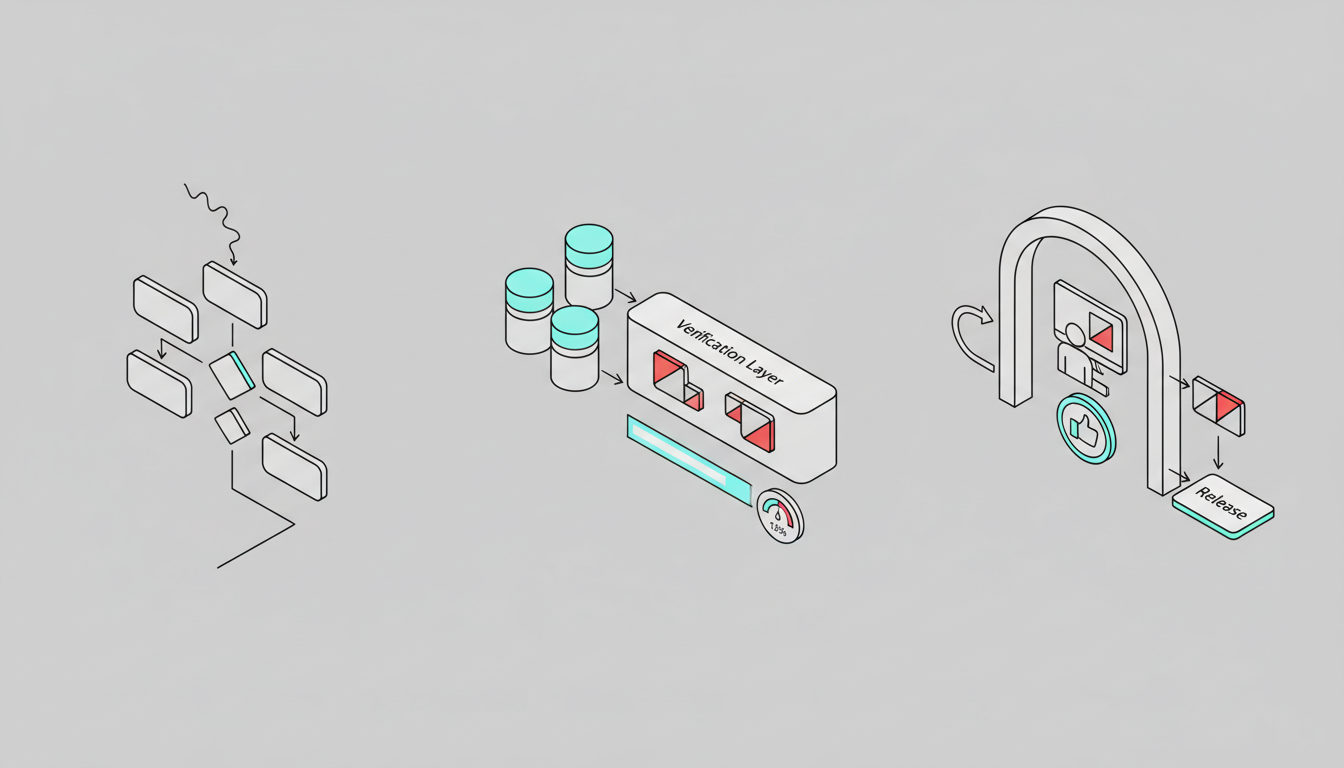
Use this framework to assess automation readiness.
Risk Assessment Matrix
Score each process step on impact and likelihood of errors:
- Low risk – automate fully with monitoring
- Medium risk – automate with confidence thresholds
- High risk – require human approval
- Critical risk – humans only, AI assists
Map approval levels to your org chart. Junior staff can approve low-risk items. Senior staff review high-risk decisions.
Prompt and Version Control
Treat prompts like code:
- Version every prompt change
- Test before deploying to production
- Keep rollback capability for 30 days
- Document why changes were made
- Track performance impact of each version
When a prompt change causes problems, you need fast rollback. Don’t rely on memory – automate version control.
Metrics That Matter
Track these KPIs weekly:
- Task completion rate without human intervention
- Average time saved per task
- Error rate by severity level
- Human override rate and reasons
- Model disagreement frequency
- System uptime and latency
Set targets before launch. If metrics decline, pause and diagnose before continuing rollout.
Go-Live Standard Operating Procedure
Follow this sequence for every new workflow:
- Dry run – test with historical data, no live actions
- Shadow mode – run parallel to existing process, compare outputs
- Canary cohort – deploy to 10% of volume with full monitoring
- Phased rollout – expand to 50%, then 100% over two weeks
- Steady state – monitor weekly, tune quarterly
Each phase needs explicit approval to proceed. If error rates exceed budget, roll back to previous phase.
Governance and Compliance
AI workflows in regulated industries need extra controls.
Data Handling
Protect sensitive information:
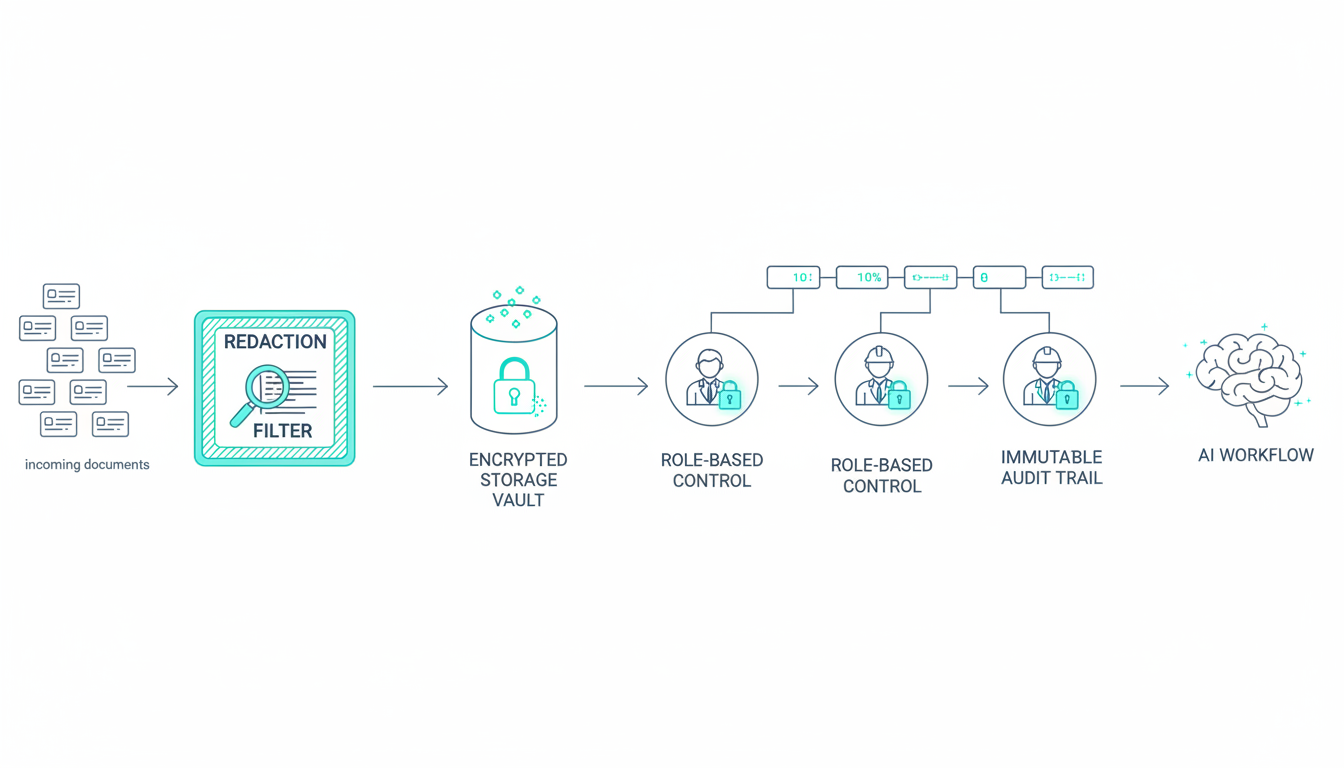
- Redact PII before sending to AI models
- Use encrypted storage for all workflow data
- Implement role-based access controls
- Maintain audit trails for compliance
- Set data retention policies by data type
If your workflow touches customer data, legal review is mandatory. Don’t skip this step.
Change Management
New workflows disrupt existing processes. Manage the transition:
- Train staff on new approval interfaces
- Document escalation paths for edge cases
- Create feedback loops for improvement
- Celebrate early wins to build momentum
The humans in your loop determine success. If they don’t trust the system, they’ll work around it.
Frequently Asked Questions
How do I handle disagreements between AI models in production?
Route to human review when models disagree significantly. Set a disagreement threshold based on your error budget – if models diverge by more than 30% in confidence or reach different conclusions, flag for human decision. Log these cases to identify patterns that need prompt refinement or additional training data.
What approval gates should I add for compliance and governance?
Add human approval before any irreversible action, especially those involving legal obligations, financial transactions, or PII. Use role-based approvals tied to impact level – junior staff for routine decisions, senior staff for high-stakes choices. Maintain audit trails showing who approved what and when, with full context of the AI recommendation.
Should I use a single AI model or orchestrate multiple models?
Use single models for low-stakes, well-defined tasks. Orchestrate multiple models when accuracy matters and errors are costly. Multiple models catch each other’s blind spots through cross-verification. Sequential orchestration works better than parallel queries because each model builds on previous context.
How do I measure if my AI workflow is actually working?
Track task success rate, human override frequency, error rate by severity, and time saved. Set baselines before automation and measure weekly. If human override rate exceeds 20%, your automation needs refinement. If error rate climbs above your budget, pause and diagnose root causes before continuing.
What’s the difference between AI workflow automation and RPA?
RPA handles structured, repetitive tasks by mimicking human clicks through interfaces. AI workflow automation interprets unstructured data and makes contextual decisions. Use RPA for data entry and system navigation. Use AI for document interpretation and judgment calls. Combine both in hybrid workflows where appropriate.
Ship Workflows That Work
Reliable AI workflow automation requires more than connecting APIs to language models. You need cross-verification to catch hallucinations, human approval at risk points, and observability to measure what matters.
The key principles:
- Automate only where AI adds resilience, not just speed
- Design for disagreement between models as a feature
- Keep humans in the loop at risk inflection points
- Measure success rate, override rate, and error rate weekly
- Scale only after proving reliability in controlled pilots
You now have a blueprint to build AI workflows that survive production pressure. Start with one high-value process, implement safety controls, and prove the model before expanding.