Stop guessing with a single bot. When getting it wrong costs more than getting it right, you need systems that think and challenge together. AI agents go beyond chat interfaces to plan, use tools, remember context, and collaborate on complex tasks.
Single AI chats sound confident but miss edge cases, fabricate citations, and loop on tasks. In high-stakes work, blind spots are expensive. A chatbot answers questions. An agent solves problems by breaking them into steps, calling external tools, and refining its approach based on feedback.
This guide defines AI agents, shows how they work, covers their limitations, and provides a roadmap to deploy them safely. You’ll learn the difference between single agents, multi-agent systems, and orchestrated multi-model approaches that cross-verify outputs to reduce risk.
AI Agents vs Chatbots: Understanding the Difference
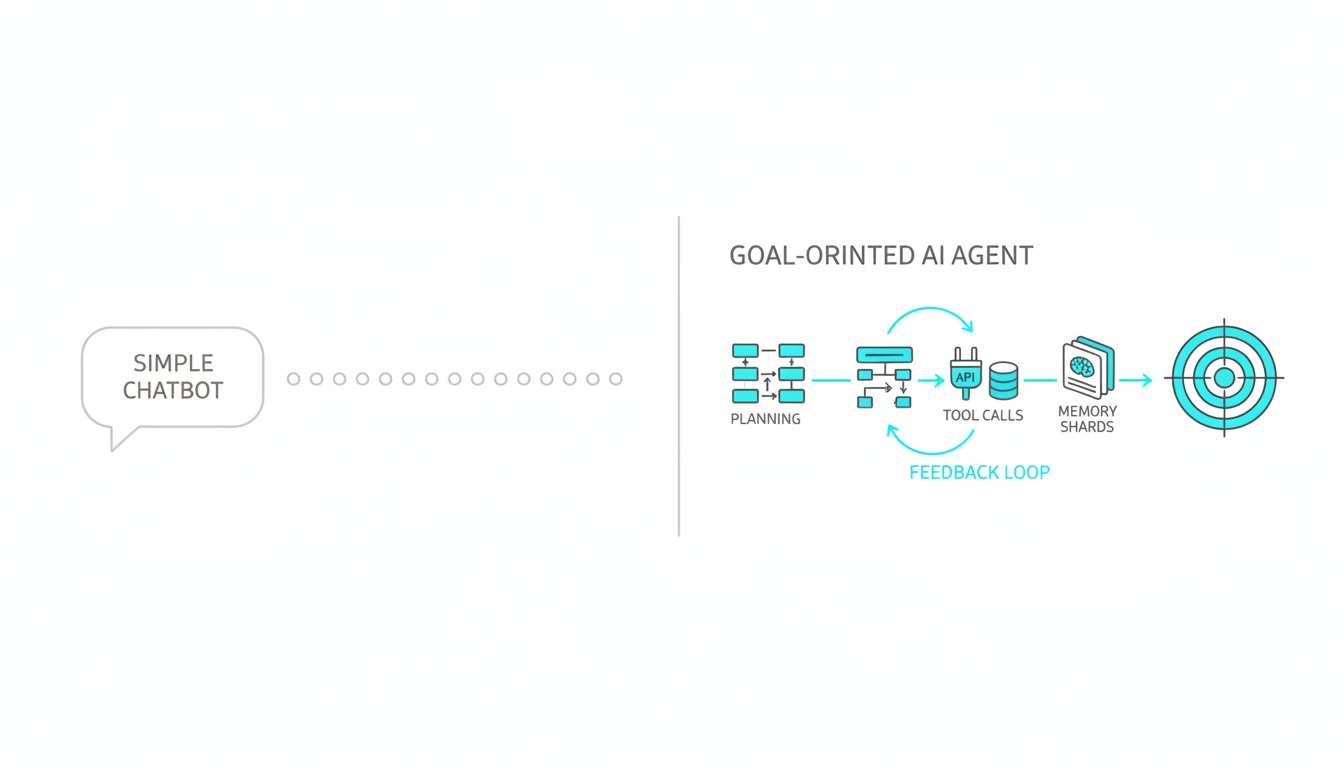
A chatbot responds to prompts. An autonomous AI agent pursues goals. The distinction matters when reliability counts.
Core Characteristics of AI Agents
- Goal-oriented behavior – Agents work toward defined objectives rather than answering isolated questions
- Planning and decomposition – Break complex tasks into manageable steps
- Tool use and API integration – Call external systems, databases, and services to gather information or take action
- Memory and context management – Track conversation history and task state across multiple interactions
- Feedback loops – Evaluate results, adjust strategy, and retry when initial attempts fail
Chatbots generate text based on patterns. Agents execute workflows. The difference shows up when you ask for research synthesis, financial reconciliation, or compliance checking. A chatbot gives you an answer. An agent verifies sources, flags conflicts, and documents its reasoning.
When to Use Agents Instead of Simple Prompts
Deploy agents when tasks require multiple steps, external data, or verification. Use simple prompts for straightforward questions or content generation.
- Research tasks requiring citation verification and source triangulation
- Financial analysis with cross-checks against multiple data sources
- Compliance workflows that need audit trails and evidence documentation
- Strategy development requiring multi-perspective analysis
- Technical troubleshooting with iterative diagnosis and testing
The cost and complexity of agents only make sense when accuracy and process matter more than speed. For professionals in regulated industries or decision-makers who can’t afford errors, that threshold is low.
How AI Agents Work: Architecture and Components
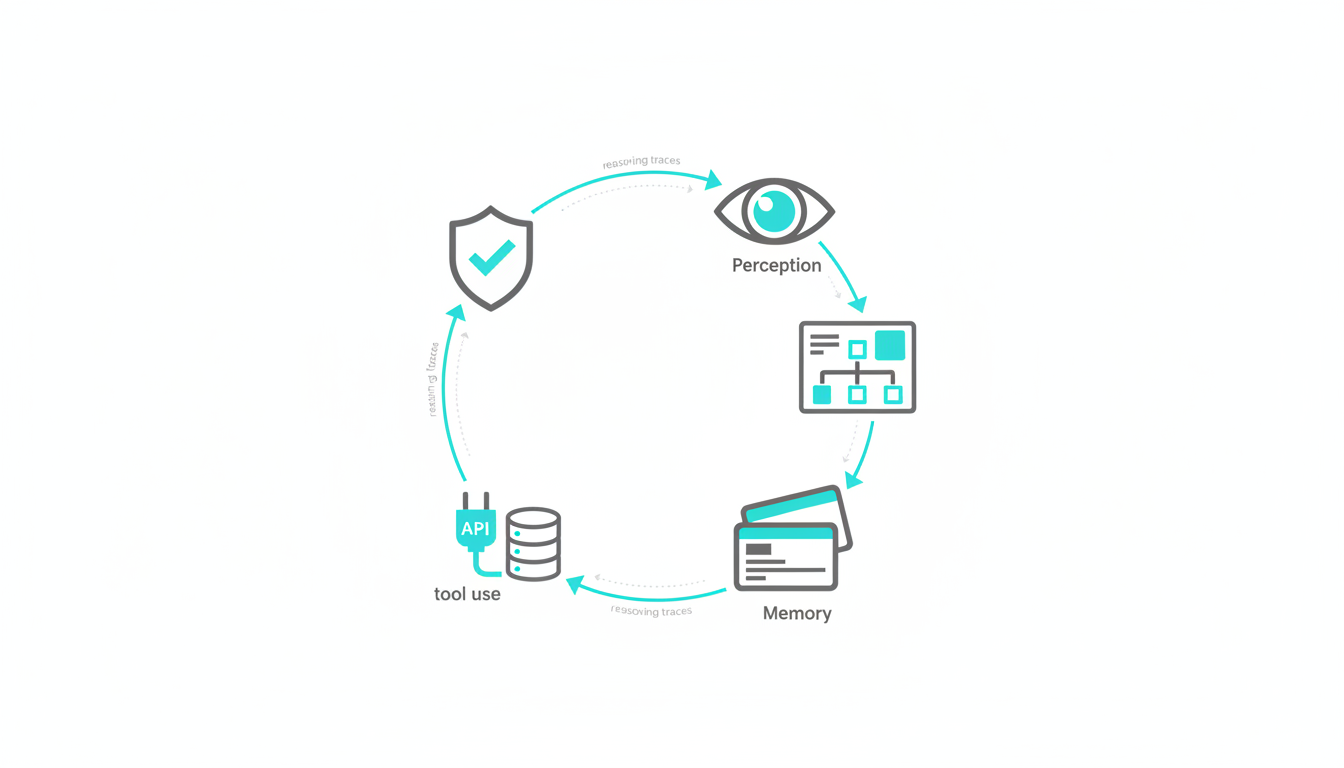
Understanding agent architecture helps you evaluate frameworks and design reliable systems. Every agent combines five core components that work together in a continuous loop.
The Five-Component Agent Architecture
- Perception – Intake goals, constraints, and environmental data
- Planning – Decompose objectives into executable steps with dependencies
- Memory – Store conversation context, intermediate results, and learned patterns
- Tool use – Execute API calls, database queries, and external service requests
- Feedback – Evaluate outcomes, detect errors, and adjust strategy
This architecture mirrors human problem-solving. You assess the situation, make a plan, remember what you’ve tried, use available tools, and adjust based on results. Agents automate this cycle at machine speed with explicit reasoning traces.
Common Agent Patterns and Frameworks
Several patterns have emerged for implementing agents. The ReAct pattern combines reasoning and action in alternating steps. The agent thinks about what to do next, takes an action, observes the result, and repeats until the goal is met.
- ReAct (Reasoning and Acting) – Interleave thought and action for transparent decision-making
- Plan-and-Execute – Generate complete plan upfront, then execute steps sequentially
- Reflexion – Add self-critique and refinement after initial attempts
- State machines – Define explicit states and transitions for complex workflows
Frameworks like LangGraph provide state machine abstractions. AutoGPT-style loops run planning and execution cycles autonomously. The choice depends on task complexity and required control. State machines give you precise governance. Autonomous loops adapt to unexpected conditions.
Single Agent vs Multi-Agent vs Multi-LLM Orchestration
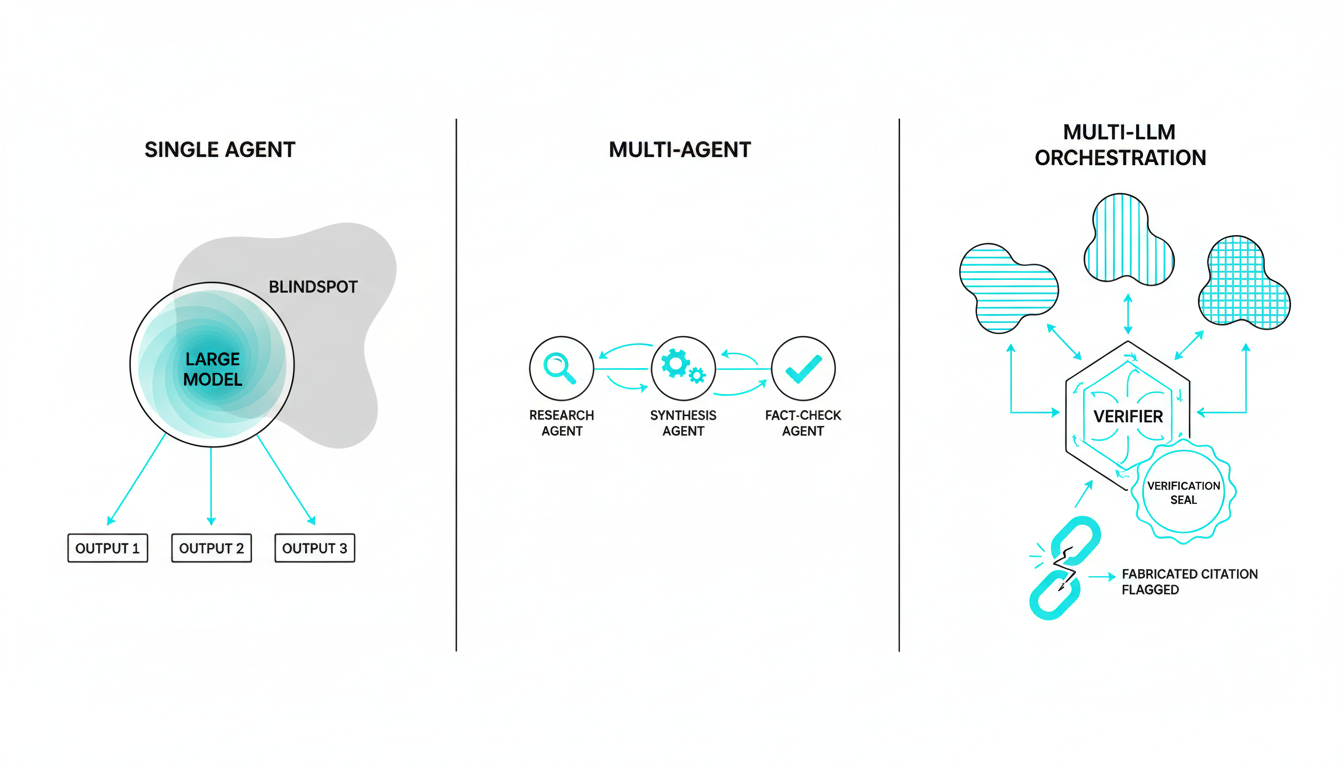
Not all agent architectures deliver the same reliability. The number of models and how they interact determines failure modes and blind spot coverage.
Single Agent Limitations
A single agent using one language model inherits that model’s biases, knowledge gaps, and reasoning patterns. It can’t catch its own hallucinations or challenge its assumptions. When the model confidently fabricates a citation or misses an edge case, nothing stops it.
- No cross-verification of facts or reasoning
- Blind to model-specific weaknesses and biases
- Can’t detect when it’s operating outside training distribution
- Loops on tasks it doesn’t know how to solve
Multi-Agent Systems
Multi-agent systems deploy multiple specialized agents that collaborate on different aspects of a task. One agent handles research, another synthesizes findings, a third fact-checks. This division of labor improves efficiency but doesn’t guarantee accuracy if all agents use the same underlying model.
Multi-LLM Orchestration for Cross-Verification
Orchestrating multiple frontier models in sequence creates friction between different reasoning approaches. When GPT, Claude, and Gemini analyze the same problem, disagreements surface blind spots. One model’s hallucination gets caught by another’s fact-checking. Learn how multi-AI orchestration works to see cross-verification in practice.
- Each model sees full conversation context and builds on previous responses
- Disagreement reveals edge cases and unstated assumptions
- Cross-verification catches fabricated citations and logical errors
- Sequential reasoning compounds rather than averaging perspectives
The medical consilium model applies here. You don’t want five doctors giving independent diagnoses. You want them to review each other’s reasoning and challenge weak conclusions. See cross-verification in action for high-stakes decisions where errors carry real consequences.
Agent Execution: From Goal to Verified Output
Understanding how an agent executes a task helps you design guardrails and safety controls. Walk through a typical workflow to see where failures occur and how to prevent them.
Step-by-Step Agent Workflow
- Goal intake and constraint definition – Specify objective, success criteria, budget limits, and prohibited actions
- Planning and decomposition – Break goal into subtasks with dependencies and verification checkpoints
- Tool selection and guarded execution – Choose appropriate APIs, apply rate limits, validate inputs before calls
- Memory updates and context management – Store intermediate results, track what’s been tried, maintain conversation coherence
- Evaluation and cross-checks – Verify outputs against criteria, flag inconsistencies, document reasoning trails
Each step introduces failure modes. Planning can produce infeasible sequences. Tool calls can timeout or return errors. Memory can grow unbounded and exceed context limits. Evaluation benchmarks catch these issues before they cascade.
Guardrails and Governance Controls
Production agents need explicit constraints. Set budget caps to prevent runaway API costs. Define approval gates for high-risk actions. Log every tool call and reasoning step for audit trails.
- Cost limits per task and per hour to prevent budget overruns
- Timeout thresholds to kill infinite loops
- Approval requirements for data deletion or external communications
- Input validation to block prompt injection attacks
- Output filtering to catch prohibited content before delivery
Governance isn’t optional for professional use. When an agent drafts a legal memo or generates financial scenarios, you need evidence trails showing what sources it consulted and what reasoning it applied. Logging enables accountability. Approval gates prevent automation from making decisions humans should own. Explore our approach to governance for professional contexts.
Real-World Applications and Industry Examples
AI agents deliver value when tasks involve multiple steps, external data, and verification requirements. See how different industries deploy them for workflow automation and quality control.
Legal Research and Citation Verification
Law firms use agents to review case law, verify citations, and flag conflicting precedents. An agent searches legal databases, cross-references cited cases, checks for subsequent appeals or reversals, and documents the verification trail. Paralegals review the output before attorneys rely on it.
Financial Reconciliation and Scenario Analysis
Finance teams deploy agents to reconcile transactions across systems, identify discrepancies, and generate audit documentation. For scenario planning, agents pull historical data, apply different assumption sets, and flag outliers that need human review. The agent handles data gathering and initial analysis. Analysts interpret results and make decisions.
Research Synthesis and Literature Review
Researchers use agents to scan papers, extract key findings, identify methodological gaps, and surface contradictory results. An agent can process hundreds of abstracts, cluster related work, and generate annotated bibliographies. Human researchers focus on interpretation and novel hypothesis generation rather than manual literature searches.
Compliance Checklist Generation
Regulated industries use agents to generate compliance checklists based on current regulations, company policies, and project specifics. The agent pulls requirements from multiple sources, identifies applicable rules, and produces evidence-backed checklists. Compliance officers review and approve before deployment.
Watch this video about AI agents:
Watch this video about AI agents:
Watch this video about ai agents:
Watch this video about AI agents:
Watch this video about AI agents:
These examples share common patterns. Agents handle structured data gathering, cross-referencing, and initial analysis. Humans provide judgment, handle edge cases, and make final decisions. The division of labor improves efficiency without sacrificing accountability.
Limitations, Failure Modes, and Risk Mitigation
Every agent system has failure modes. Understanding them helps you design mitigations and set realistic expectations. Don’t deploy agents blind to these risks.
Common Agent Failures
- Infinite loops – Agent gets stuck retrying the same failed approach without recognizing futility
- Tool errors – External API timeouts, rate limits, or malformed responses break workflows
- Hallucinated tool calls – Agent invents APIs or parameters that don’t exist
- Context overflow – Memory grows until it exceeds model context limits, causing truncation
- Cost overruns – Unconstrained tool use racks up API charges faster than expected
- Prompt injection – Malicious inputs trick agent into ignoring constraints or leaking data
Mitigation Strategies
Design agents with explicit failure handling. Set maximum retry counts to break loops. Implement circuit breakers that pause execution after repeated tool errors. Validate tool calls against known schemas before execution. Monitor memory usage and summarize context when approaching limits.
- Define clear success criteria and termination conditions upfront
- Set hard budget caps and timeout thresholds per task
- Validate all tool inputs and outputs against expected schemas
- Log every decision and tool call for post-execution review
- Run offline tests with adversarial prompts before production deployment
- Implement human approval gates for high-risk actions
The most reliable systems use multi-LLM orchestration to cross-verify reasoning and catch errors. When multiple models review each other’s work, hallucinations and edge case failures get flagged before they propagate. Disagreement becomes a safety feature rather than a bug.
Getting Started: Agent Deployment Checklist
Launch your first agent with clear constraints and measurement. Start small, validate thoroughly, then scale with governance in place.
Pre-Deployment Checklist
- Pick a well-defined task with clear success criteria and measurable outcomes
- Define guardrails including budget caps, timeout limits, and prohibited actions
- Set up logging infrastructure to capture reasoning traces and tool calls
- Create offline test cases including adversarial prompts and edge cases
- Establish approval workflows for high-risk outputs before they go live
- Document rollback procedures if agent behavior becomes unreliable
Evaluation and Iteration
Measure agent performance against explicit benchmarks. Track success rate, average cost per task, time to completion, and error types. Use these metrics to refine prompts, adjust tool selection, and tune guardrails.
- Success rate on predefined test cases
- Cost per successful task completion
- Time from goal intake to verified output
- Error frequency by category (tool failures, loops, hallucinations)
- Human intervention rate for approval gates and error recovery
Start with a single use case. Validate thoroughly. Document what works and what fails. Then expand to adjacent tasks using proven patterns. Rushing to production without measurement leads to expensive failures and lost trust. Start your first orchestration with tight guardrails.
Cost Control and Scaling
Agent costs come from LLM API calls, tool invocations, and memory storage. Control them with batching, caching, and adaptive tool selection. Batch similar queries to reduce redundant API calls. Cache frequent tool results to avoid repeated lookups. Use cheaper models for simple subtasks and reserve frontier models for complex reasoning.
- Batch similar queries to minimize API overhead
- Cache frequent tool results with appropriate TTLs
- Route simple subtasks to smaller, cheaper models
- Monitor per-task costs and set alerts for anomalies
- Implement progressive enhancement where agents try cheap approaches first
As you scale, governance becomes critical. Implement approval workflows for new agent types. Require documentation of reasoning patterns and failure modes. Run regular audits of logs to catch drift or unexpected behavior. Treat agents as production systems that need monitoring, not experiments.
Frequently Asked Questions
What makes an AI system an agent versus a chatbot?
Agents pursue goals through planning, tool use, and iterative refinement. Chatbots respond to prompts without maintaining task state or calling external systems. Agents decompose complex objectives into steps, execute actions, and adjust based on feedback. Chatbots generate text based on input patterns.
Can agents work autonomously without human oversight?
Agents can execute predefined workflows autonomously within guardrails, but high-stakes applications require human approval gates for critical decisions. Autonomous execution makes sense for data gathering, initial analysis, and routine tasks. Human oversight remains essential for final decisions, edge case handling, and accountability in regulated contexts.
How do you prevent agents from hallucinating or making costly errors?
Implement guardrails including budget caps, timeout limits, input validation, and output verification. Use cross-verification by orchestrating multiple models to review each other’s reasoning. Set up logging and audit trails to catch errors after execution. Run offline tests with adversarial prompts before production deployment.
What frameworks are best for building reliable agents?
LangGraph provides state machine abstractions for complex workflows with explicit control flow. ReAct patterns work well for transparent reasoning traces. The best framework depends on your task complexity, required governance level, and team expertise. Start with simple patterns and add complexity only when needed.
When should you use multiple agents versus a single agent?
Use multiple agents when tasks have distinct specialized subtasks that benefit from division of labor. Use orchestrated multi-model agents when cross-verification and blind spot detection matter more than efficiency. Single agents work for straightforward workflows where one reasoning approach suffices.
How much do agent deployments typically cost?
Costs vary based on task complexity, model selection, and tool usage frequency. Simple agents running on smaller models cost pennies per task. Complex agents using frontier models with extensive tool calls can cost dollars per execution. Set budget caps and monitor per-task costs to prevent overruns.
Key Takeaways and Next Steps
You now understand what AI agents are, how they differ from chatbots, and how to deploy them safely for professional work. The architecture is straightforward: perception, planning, memory, tool use, and feedback working together in a continuous loop.
- Agents plan, use tools, and iterate to achieve goals beyond simple question-answering
- Reliability requires evaluation benchmarks, guardrails, and human oversight for high-stakes decisions
- Orchestrating multiple models surfaces blind spots through cross-verification and disagreement
- Start small with clear constraints, cost controls, and measurable success criteria
- Scale with governance including logging, approval gates, and regular audits
The difference between a chatbot that sounds confident and an agent that delivers verified results matters when errors are expensive. Single models miss edge cases. Orchestrated systems catch them through friction between different reasoning approaches.
For professionals making high-stakes decisions, the question isn’t whether to use agents. It’s how to deploy them with appropriate safeguards and measurement. Start with a well-defined use case. Implement guardrails. Measure results. Iterate based on evidence.
Explore orchestrated intelligence approaches to see how cross-verification patterns reduce risk and improve outcomes in professional workflows where getting it right matters more than getting it fast.